
Project Summary
Quick Summary
Fine Art Canvas sells customizable wall art, and each item needed 300–350 unique SKUs that Shopify’s native structure could not track. WebDesk Solution built a custom Shopify Plus app with an AWS-hosted Variant Engine, real-time 3D previews and an SKU-level discount Rule Engine. Results: conversion rose from 0.87% to 3.87%, revenue grew from $10K to $8.81M, and average order value rose from $200 to $280.
The Context
Overview
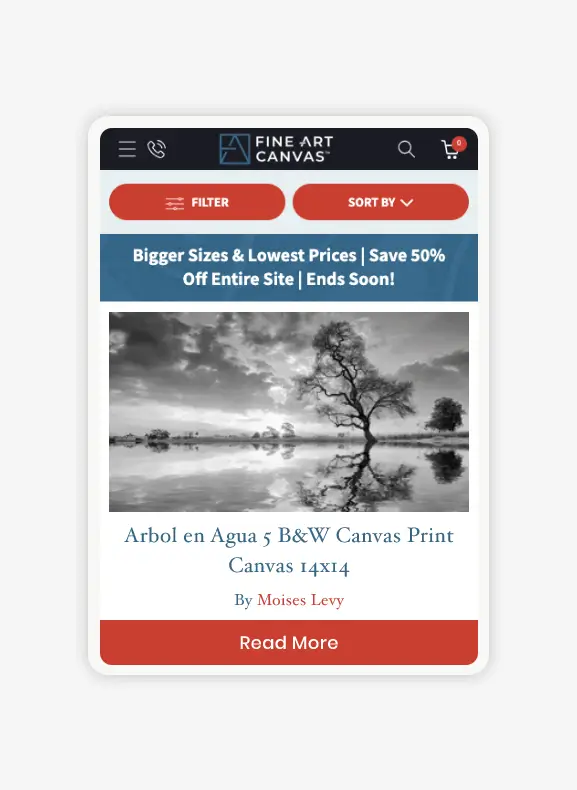
WebDesk Solution built a custom Shopify Plus application for Fine Art Canvas to manage more than 300 product combinations per item, automate image generation, and deliver real-time product previews. The solution connected Shopify with an AWS-hosted backend, custom variant logic, and dynamic media workflows so Fine Art Canvas could reduce manual Photoshop work, keep pricing and inventory accurate, and maintain fast storefront performance.
Fine Art Canvas (FAC) sells customizable wall art, including canvas prints, framed canvases, floating frames and poster prints. As its catalog swelled to hundreds of variant combinations per product (size, color, SKU, pricing), Shopify’s native capabilities fell short: product images were made by hand in Photoshop, 300–350 unique SKUs per item could not be tracked, and shoppers had no immersive previews. FAC partnered with WebDesk Solution on Shopify custom app development to build an external application that syncs with Shopify, automates image generation, and supports an interactive customer experience.
WebDesk Solution delivered custom Shopify Plus app development, AWS-hosted backend architecture, and Shopify Storefront API integration to support variant, media, and pricing logic.
PROJECT SCREENS


Approach
When FAC first approached WebDesk Solution, they were still relying on manual Photoshop routines: designers spent hours exporting corner-shot images, swapping backgrounds, and stitching together lifestyle mockups for each product variant. This wasn’t sustainable as their inventory grew. Daniel from WebDesk Solution dove deep into their operations, conducting one-on-one workshops with FAC’s merchandising and design teams. This phase included workflow discovery, variant architecture planning, and automation design for previews, pricing rules, and product media. We analyzed competitor reference sites, mapped out every pain point, and sketched a workflow that would decouple heavy image-processing tasks from Shopify’s frontend. Our strategy was to build a Custom Shopify Plus App hosted on a secure external server-leveraging JSON-based product mapping, metafields, and a logic engine that would power real-time 3D rendering. To minimize latency, we designed an asynchronous image-preloading mechanism and optimized image compression. On the backend, we architected a rules engine to manage unlimited variant combinations, conditional discounts, and video assignments. This blueprint allowed us to maintain Shopify performance while delivering advanced real-time preview features through Shopify Plus app development.
What challenges did Fine Art Canvas face before its custom Shopify Plus app?
Fine Art Canvas sold four product types, each needing 300–350 unique SKUs, and Shopify’s native capabilities could not carry that catalog. Six problems followed: SKU volume beyond a single Shopify product record, previews that could not update instantly, lifestyle mockups made by hand, corner shots that had to match each selection, videos linked product by product, and discounts that could not target individual SKUs.
Fine Art Canvas could not fit 300–350 SKUs per item into a single Shopify product
Fine Art Canvas offered four primary product types-canvas, framed canvas, floating frame, and poster-each requiring 300–350 unique SKUs based on size, material, and finish. In 2024–2025, the Shopify variant limit of 99 per product meant FAC couldn’t accurately track inventory or pricing. Handling this volume manually in Shopify’s native structure led to errors, slowdowns, and inventory mismatches. FAC’s merchandising team had no way to represent all combinations in a single product record, which resulted in fragmented listings and out-of-sync backend data across multiple products. Without a scalable variant solution, FAC risked revenue losses from mispriced items and frustrated customers who couldn’t see the precise product configuration they wanted.
Fine Art Canvas could not update product previews instantly as shoppers chose options
FAC’s brand promise centered on giving customers confidence in their purchase by letting them see exactly how each piece would look with chosen options. However, Shopify’s liquid-based template engine couldn’t handle on-the-fly 3D rendering or image swapping without page reloads. FAC’s previews had to update as a shopper selected size, frame type, or color, reflecting subtle visual differences instantly. Traditional image swapping led to delays, flickering, and long load times, which risked high bounce rates and abandoned carts. The technical challenge was twofold: first, to store and serve all variant images in a way that could be retrieved instantly; second, to integrate that logic into Shopify’s cart pipeline without compromising performance. A seamless live preview could not be delivered inside Shopify’s standard theming framework.
Fine Art Canvas could not scale hand-made lifestyle mockups across 300+ SKUs
Beyond simple product previews, FAC wanted to evoke emotion by showing artwork “in context”-a modern living room, an office wall, or a cozy bedroom nook. But manually creating hundreds of lifestyle mockups in Photoshop was unscalable. Each variant a shopper selected needed a relevant lifestyle image behind the art. The complexity lay in matching each of the 300+ SKUs to the correct room setting, ensuring color temperature, perspective, and lighting matched perfectly. Any mismatch would break immersion and erode trust. Additionally, the system had to support high-resolution image assets without causing front-end lag. Image quality had to be balanced against load speed, while lifestyle previews stayed accurate and high-fidelity.
Fine Art Canvas struggled to show the right corner shot for each selection
Art buyers care about texture and material up close-a corner shot reveals canvas grain, frame bevel depth, or mat thickness. FAC maintained a library of corner-shot images for every frame type and finish, but displaying the correct one based on a shopper’s selection was nontrivial. The logic had to detect the combination of product type, variant color, and material, then swap in the matching corner shot seamlessly alongside the main preview. Every SKU needed its own matching corner shot, and the wrong one would show the wrong material detail. A mismatched corner shot would undermine trust and damage perceived quality.
Fine Art Canvas managed product videos by hand, one product at a time
Some premium products came with short “demo” or “showcase” videos-framed canvases swaying gently, close-ups of brush strokes, or matte finishes catching light. FAC’s previous approach was ad-hoc: videos were uploaded to Shopify files and manually linked per product. This didn’t scale with hundreds of SKUs and led to inconsistent video placements. A shopper who selected “Framed Canvas – Matte Black” had to see only the relevant video. Irrelevant videos had to stay hidden, and relevant ones had to load without delay.
Fine Art Canvas could not apply discounts to specific SKU combinations in Shopify
FAC ran promotions-“Buy any Large Framed Canvas in Glossy White and get 10% off”-but Shopify’s discount engine couldn’t target individual SKUs within a multi-variant product. When a shopper picked a qualifying combination, the front-end had to display the discounted price in real time. If the combination didn’t qualify, the price stayed at list. Incorrect pricing displays would lead to abandoned carts or support tickets, eroding brand reputation.
Key Metrics



SIMILAR PROJECT?
Planning a custom Shopify app for a large variant catalog?
How did WebDesk Solution solve Fine Art Canvas’s variant, preview and media challenges?
WebDesk Solution answered each challenge with a matching build: a standalone Variant Engine, a Live Preview Generator, lifestyle image integration, a corner shot preview system, flexible video management, and a discount Rule Engine.
WebDesk Solution built a standalone Variant Engine that holds 300+ combinations behind one Shopify product
To bypass Shopify’s 99-variant limit of 2024–2025, WebDesk Solution built a standalone Variant Engine hosted on AWS, decoupling variant logic from Shopify’s native structure. Each product’s possible configurations (size, frame type, finish, material) were stored in a JSON schema within a custom metafield. When FAC’s merchandising team added or updated variants, the engine generated a hierarchical mapping: concatenated keys representing every combination along with its own SKU, price, and inventory level. Using Shopify’s Storefront API, the app injected an invisible “proxy product” that encapsulated all 300+ combinations without bloating Shopify’s variant table. This approach ensured each combination maintained a unique SKU, price, and stock count in our external database, yet appeared as a single product in Shopify. Administrators could now manage unlimited variants without UI clutter, maintain accurate inventory tracking, and apply promotional logic at the variant level. This Custom Variant Engine laid the foundation for all subsequent features.
Key deliverables:
- Standalone engine on AWS: variant logic was decoupled from Shopify’s native structure and hosted separately on AWS.
- JSON schema in a metafield: each product’s configurations (size, frame type, finish, material) were stored as a JSON schema in a custom metafield.
- Hierarchical mapping: when merchandisers changed variants, the engine generated concatenated keys for every combination, each with its own SKU, price, and inventory level.
- Invisible proxy product: the app injected one proxy product that encapsulated all 300+ combinations without bloating Shopify’s variant table.
- Result: every combination kept a unique SKU, price, and stock count, enabling accurate inventory tracking and variant-level promotions.
WebDesk Solution built a Live Preview Generator with real-time image swapping
To create a frictionless preview experience, we built a Live Preview Generator module in React that communicates with our AWS-hosted rendering service. As a shopper selects “24×36 Framed Canvas – Glossy Black,” the front end sends a lightweight AJAX request containing the chosen attributes. The rendering service returns pre-buffered image URLs-optimized for web delivery-accompanied by file metadata. Using a smart preloading strategy, we ensured images were fetched in the background based on likely next choices (e.g., common sizes or popular frame colors), so when a user clicked, the image swap was instantaneous. The React component leveraged CSS transitions to fade between visuals, eliminating flicker. To further optimize, we served WebP format images with multiple resolution variants (low-res for mobile, high-res for desktop), automatically selected via the browser’s device hints. The result was a zero-delay swapping engine that delivered a premium, interactive experience-driving up engagement and checkout confidence.
We built this as a specialized rendering pipeline outside Shopify’s standard theming framework.
Key deliverables:
- React preview module: a Live Preview Generator in React sent the shopper’s chosen attributes to an AWS-hosted rendering service in a lightweight AJAX request.
- Pre-buffered images: the rendering service returned web-optimized image URLs together with file metadata.
- Background preloading: images for likely next choices, such as common sizes or popular frame colors, were fetched before the shopper clicked.
- WebP at several resolutions: low-resolution files served mobile and high-resolution files served desktop, selected through the browser’s device hints.
- Result: image swaps became instantaneous, and CSS transitions faded between visuals without flicker.
WebDesk Solution integrated lifestyle images with conditional logic
For an immersive “art in context” experience, we created a comprehensive Image Bank of lifestyle settings-living rooms, offices, bedrooms-tagged by lighting, wall color, and furniture style. Each variant combination was mapped to a subset of these tags. When a user selected “Framed Canvas – Glossy White,” our app evaluated the variant’s tags (e.g., “white frame,” “modern art”), fetched relevant lifestyle images via a GraphQL query, and overlaid the 3D art canvas into the scene. This was achieved through HTML5 Canvas compositing on the front end: our React component stripped the alpha channel from the product image and placed it atop the chosen background in real time. To address performance, we implemented lazy loading and progressive JPEGs for lifestyle shots, delivering a crisp visual without jamming the network. Shoppers could now see “their” art hanging above a mid-century sofa or in a minimalist office-extending beyond standard eCommerce and transforming inspiration into reality.
Key deliverables:
- Lifestyle Image Bank: living rooms, offices, and bedrooms were tagged by lighting, wall color, and furniture style.
- Variant-to-tag mapping: each variant combination mapped to a subset of tags, and a GraphQL query fetched the matching lifestyle images.
- Canvas compositing: HTML5 Canvas placed the product art on the chosen background on the front end.
- Performance handling: lazy loading and progressive JPEGs kept lifestyle shots crisp without jamming the network.
- Result: shoppers could see their chosen art hanging in a room setting as they selected options.
WebDesk Solution built a dynamic corner shot preview system
To highlight material quality, we built a Corner Shot Preview System that loaded micro-rendered images at 300 DPI resolution for each frame type and finish. During catalog ingestion, the app processed corner-shot assets, assigning them unique metafield references keyed to “frame-type:finish:angle.” On the front end, a React hook listened for changes in the selected frame and finish attributes, then fetched the appropriate corner-shot URL from our AWS S3 bucket. We leveraged Next-Gen image components that automatically selected the optimal resolution based on viewport size-ensuring desktop users saw ultra-sharp details and mobile users saw lighter files. The corner shot appeared in sync with the main 3D preview and lifestyle render, thanks to a shared state context in Redux. This cohesive synchronization meant shoppers never saw mismatched visuals; they could inspect the canvas texture, frame bevel, and mat depth in a single, coordinated preview session.
Key deliverables:
- Micro-rendered corner shots: images at 300 DPI resolution were prepared for each frame type and finish.
- Metafield references: during catalog ingestion, each corner-shot asset received a unique metafield reference keyed to “frame-type:finish:angle.”
- React hook and S3: a React hook listened for frame and finish changes and fetched the matching URL from an AWS S3 bucket.
- Responsive images: Next-Gen image components chose the resolution by viewport, giving desktop users sharp detail and mobile users lighter files.
- Result: a shared Redux state kept the corner shot, main preview, and lifestyle render in sync, so shoppers never saw mismatched visuals.
WebDesk Solution built flexible video management for product-type-specific videos
We addressed FAC’s need for product-type-specific videos by extending Shopify’s metafields to store video metadata (video ID, file type, resolution, and associated variant tags). Administrators uploaded videos via our app’s custom backend interface, mapping each file to relevant tags-“Framed Canvas – Matte Black” or “Floating Frame – Gold.” On the product page, our React player component queried Shopify’s Storefront API for these metafields and injected only the matching video. If a shopper selected a variant with no video, the player component replaced itself with a placeholder or called the next available video in the queue. Videos were served through a secure CDN, auto-playback was disabled by default (to avoid page jank), and lazy loading ensured only one high-resolution video loaded at a time. This system empowered FAC to update or swap videos without touching Shopify’s theme-maintaining a clean UI and providing relevant, rich media content exactly when it mattered.
Our player component also handled dynamic video insertion and cleanup on the front end.
Key deliverables:
- Video metadata in metafields: Shopify metafields stored each video’s ID, file type, resolution, and associated variant tags.
- Admin mapping: administrators uploaded videos through the app’s custom backend interface and mapped each file to tags such as “Framed Canvas – Matte Black.”
- Matching player: a React player read the metafields and injected only the matching video, using a placeholder or the next video when none matched.
- Loading rules: videos came through a secure CDN, auto-playback was off by default, and lazy loading kept one high-resolution video loading at a time.
- Result: FAC could update or swap videos without touching Shopify’s theme.
WebDesk Solution built advanced discount logic with front-end sync
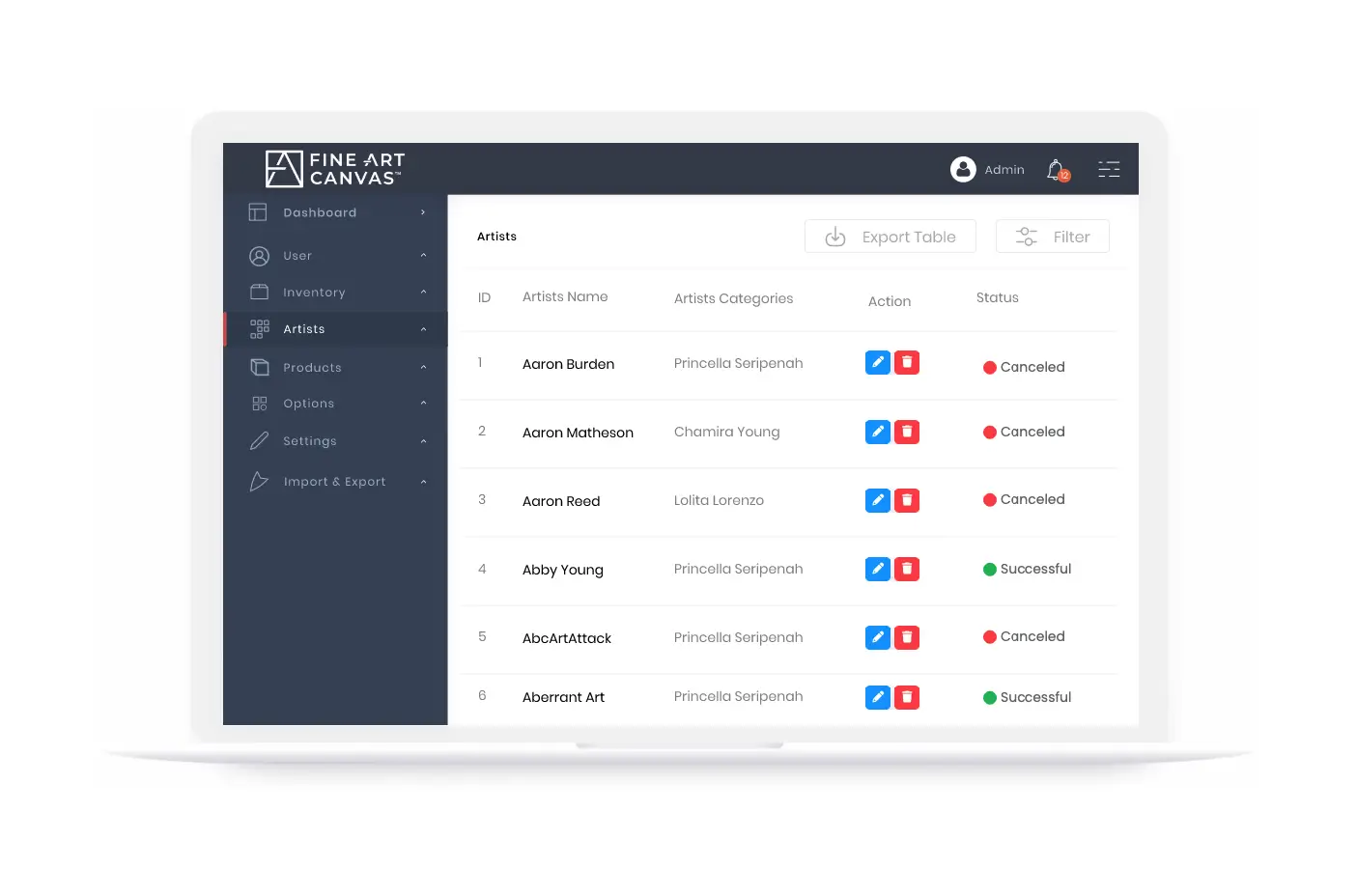
To eliminate manual discount headaches, we built a Rule Engine within our AWS backend that stored discount definitions linked to SKU combinations. Each rule specified discount type (percentage or fixed amount), eligibility criteria (e.g., size > 30″ and frame type = “Glossy White”), and date-range constraints. When a shopper selected a variant, the front end emitted an event to our Rule Engine API, which returned any applicable discount. The React UI then recalculated the product price on the fly, presenting the discounted total alongside the savings amount in a highlighted callout. Because the discount logic resided entirely in our external app, FAC’s marketing team could add or modify promotions via a simple admin dashboard-no developer help required. This eliminated pricing errors, prevented confusion at checkout, and supported a dynamic promotional strategy that could evolve with seasonal sales or clearance events.
Our discount definitions sat in a secure database of criteria mapped to SKUs.
Key deliverables:
- Rule Engine on AWS: discount definitions were stored in the AWS backend and linked to SKU combinations.
- Rule specification: each rule set a discount type (percentage or fixed amount), eligibility criteria, and date-range constraints.
- Real-time lookup: when a shopper selected a variant, the front end sent an event to the Rule Engine API, which returned any applicable discount.
- Price recalculation: the React UI recalculated the price on the fly and showed the discounted total beside the savings amount in a highlighted callout.
- Result: FAC’s marketing team could add or modify promotions through an admin dashboard with no developer help.
NEXT STEP
Need a custom Shopify app developer for a variant-heavy catalog?
What Results Did Fine Art Canvas Achieve with the Custom Shopify Plus App?
- Unlimited Variant Management: FAC now supports over 300 unique combinations per product-well beyond the 99-variant limit Shopify enforced in 2024–2025-enabling true catalog scalability.
- Instant Live Previews: Customers experience zero-delay, real-time 3D rendering as they select product attributes, reducing uncertainty and boosting confidence.
- Contextual Video Playback: Structured video management ensures only relevant demos play-enhancing storytelling and reducing page clutter.
- Operational Efficiency: FAC’s team now manages images, videos, pricing rules, and product metadata from a single private app interface-cutting manual Photoshop work by 80% and reducing error margins.
- Site Performance Maintained: Despite heavy customization, page load times remained under 2 seconds (First Contentful Paint) for desktop and 2.5 seconds for mobile, ensuring SEO and user experience remained top-tier.
Conclusion
The Fine Art Canvas project shows that when a catalog’s combinations outgrow Shopify’s native variant and media handling, an external app can carry that logic while Shopify Plus stays the storefront. The Variant Engine held every combination, each with its own SKU, price, and stock count, behind a single product, and the preview, lifestyle, corner-shot, video, and discount features were built on that foundation and kept in sync without slowing the storefront. For retailers with a similar catalog model, the order of work is the same: settle the variant architecture first, then build previews, media, and pricing rules on top of it.
Questions About Fine Art Canvas’s Custom Shopify Plus App
What went wrong at Fine Art Canvas when its SKUs could not live in one Shopify product record?
How does Fine Art Canvas track stock and price for every combination behind one Shopify product?
How do Fine Art Canvas’s product previews change without flicker or delay?
Can Fine Art Canvas apply a Shopify variant discount to one SKU combination?
What can Fine Art Canvas’s merchandising and marketing teams change without a developer?
What storefront performance did Fine Art Canvas keep after adding previews and videos?
How does Fine Art Canvas show a shopper’s art in a room setting?
How does Fine Art Canvas decide which product video plays for a selected variant?
Related Work
Related Work
Mobile-First
With a mobile-first mentality, we crafted an elegant design that seamlessly adapts to any screen size or device.