


Adobe Commerce B2B Features: What Magento Gives You Natively, and Where Custom Work Starts

Category
eCommerce Tips & Trends

Most of the eCommerce businesses are failing, not because they have a bad product, but because they consist of poor SEO techniques that search engines cannot even crawl, understand, or rank. To be honest, some eCommerce business owners are not even aware of it.
Without a strong technical SEO foundation, even high-quality products may remain hidden from potential customers. Here, the proper implementation of technical SEO is what makes your store visible, fast, and accessible to the right audience.
Organic search drives nearly 43% of all traffic to online stores, and if your store can’t rank, almost half of potential visits disappear before users even see your products. If it’s broken, rankings slip, visibility drops, and traffic decreases, leading to lost sales and revenue.
To help you fix these issues, we’ve prepared a guide with 10 actionable tips for implementing technical SEO on your eCommerce website. Follow these 10 essential tips to improve your store’s technical SEO and boost visibility.
Top 10 Tips To Do Technical SEO For eCommerce Websites
Here are the top 10 technical SEO tips you can follow to optimize your eCommerce website.
Build a Crawlable and Logical Site Architecture
Imagine you are a customer, moving through a website, but you cannot understand a single thing about where to move and what to do. This indicates a poorly structured website, which can harm your business performance. Having a logical website architecture is one of the signs of owning a reputable eCommerce business.
Not only does it impress customers, but it also allows Google to crawl your site efficiently, ensuring users can easily find products.
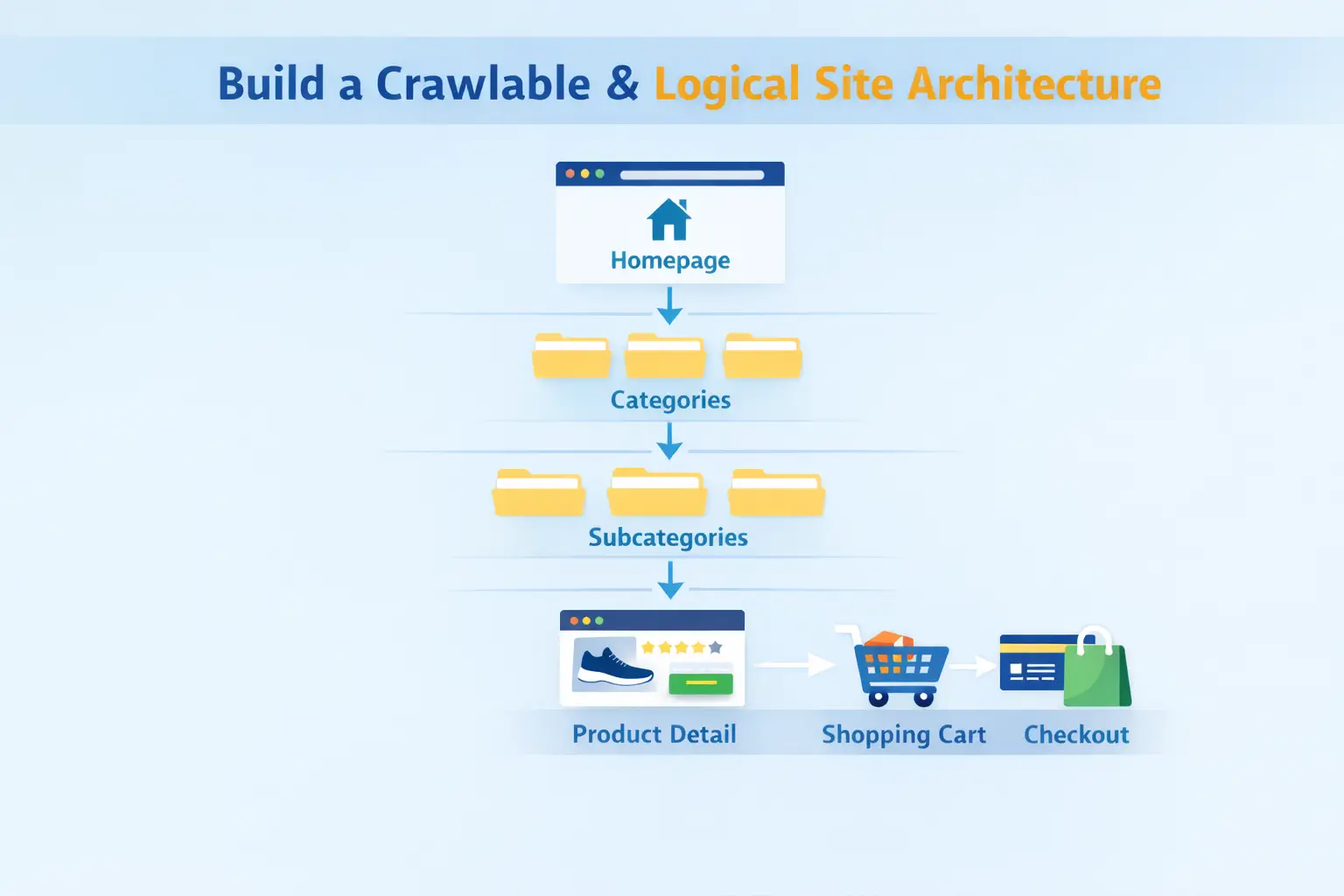
An example of a basic, strong eCommerce structure that looks like this:
Homepage > Category > Subcategory > Product detail > Cart > Checkout
Important pages on the website should be reachable within three clicks. Customers visit your site to find products, not to navigate a confusing homepage.
A perfect interlinking between products plays an equal role because it helps search engines to discover and prioritize the critical pages faster.
Once your website structure is solid, the next critical step is to ensure fast page load times, because even the best-structured site will lose users if it loads slowly.
Optimize Page Speed
Speed is considered a conversion factor where slow pages lose users before they even see your products. It’s sad.
No matter how good your product is, it’s of no use when it cannot reach your audience. A 1-second delay in page load time can reduce eCommerce conversions by up to 7%, and if pages take longer than 3 seconds to load, 53% of mobile users will abandon the site.
Factors behind slowing down your eCommerce website:
- Heavy product image, usually a bigger size takes a longer time
- Too many content scripts and apps
- Unoptimised themes of a website
Address these issues promptly to prevent negative impacts on sales.
Apply Clean and SEO-Friendly URL Structures
Your URL is something that both customers and search engines see and observe. If that’s not neat, it creates doubt and trust issues. A clean URL helps Google understand your content and sets clear expectations for users.
When someone scans search results, a readable URL builds trust and improves the chance of a click. For search engines, it provides clear context about the page topic.
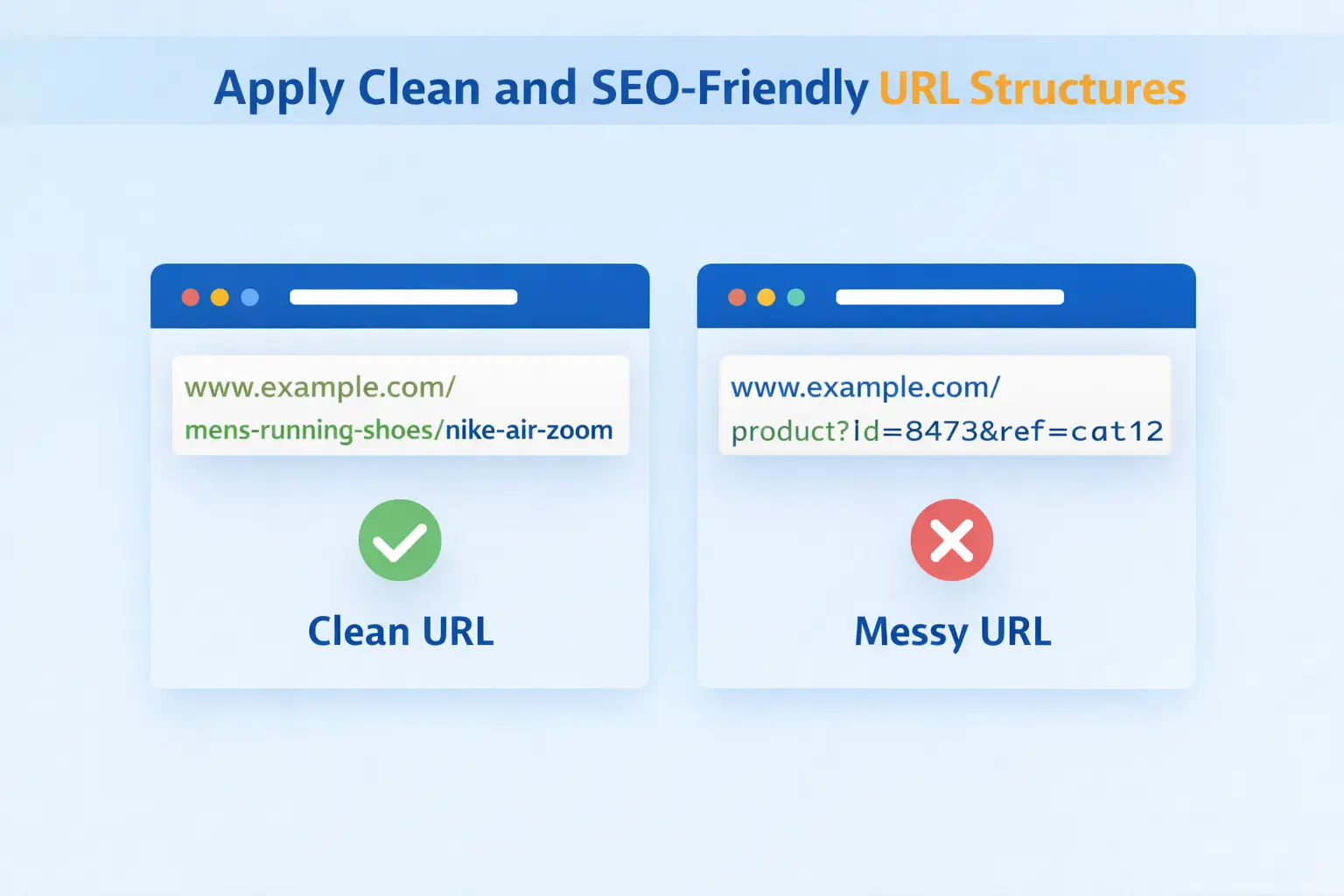
Let’s understand good and bad URL examples and see why having a neat URL structure is essential.
Neat URL: /mens-running-shoes/nike-air-zoom
This clearly tells what the page is about before it’s even opened.
Unclear URL: /product?id=8473&ref=cat12
This gives no meaningful information to users or search engines.
A few URL best practices that you should follow;
- Use lowercase letters to avoid duplication issues
- Separate words with hyphens, not underscores
- Remove unnecessary parameters and session IDs
- Keep URLs short, descriptive, and readable
A clean, well-structured URL improves click-through rates, makes pages easier to crawl, and reduces duplicate content.
That’s why it’s best to plan SEO-friendly URLs early, especially for category and product pages that drive long-term traffic.
Manage Canonicalization and URL Signals Correctly
Many eCommerce business owners are unaware of how duplicate content can be generated on their sites. Duplicate URLs can be created by filters, sorting options, and tracking parameters, resulting in multiple versions of the same product page.
Canonical tags indicate to Google which version of a page should be indexed as the primary one, preventing duplicate content issues.
For example, multiple URLs like
/shoes?color=black,
/shoes?size=10, or
/shoes?sort=price-low
should all canonicalize to the main URL: /shoes.
Ensure that canonical tags, internal links, and sitemaps are consistent, as mixed signals can confuse Google.
Implement Structured Data for Rich Search Results
Structured data helps Google understand your page content and can enhance how your pages appear in search results, such as rich snippets, which may improve visibility and click-through rates. Structured data enables features like star ratings, pricing, stock availability, and FAQ drop-downs to appear directly in search results.
These enhancements not only improve visual appeal but also increase click-through rates by answering common customer questions directly in search results.
“What basic thing can you follow?”
Add a product schema that allows Google to show good ratings, transparent pricing, and availability of the product.

Structured data helps Google understand your page content and can enhance how your pages appear in search results, such as rich snippets, which may improve visibility and click-through rates. Structured data enables features like star ratings, pricing, stock availability, and FAQ drop-downs to appear directly in search results.
These enhancements not only improve visual appeal but also increase click-through rates by answering common customer questions directly in search results.
“What basic thing can you follow?”
Add a product schema that allows Google to show good ratings, transparent pricing, and availability of the product.
Optimize Indexation with Robots and Sitemaps
Not every page on your eCommerce site should be indexed. If Google spends time crawling low-value URLs, important pages may receive less attention, reducing visibility for the content your customers are actually searching for.
Focus on indexing product pages, category pages, and valuable informational content that provides useful guidance to your customers. Make sure that you exclude filter and sort URLs, internal search result pages, and other duplicate or thin pages.
To optimize crawling and indexing:
- Use robots.txt to block crawl-heavy or low-value pages.
- Apply meta noindex to pages that should not be indexed.
- Submit clean XML sitemaps containing only canonical, indexable URLs.
Proper optimization and indexing improve crawl efficiency, ensure important pages are discovered quickly, and prevent ranking dilution.
Ensure Mobile-First Performance and Usability
Most online shopping now happens on mobile devices, and Google evaluates your eCommerce site based on its mobile usability and performance.
Poor mobile usability can negatively impact rankings, and given that 58.67% of global website traffic comes from mobile devices, it can significantly reduce potential traffic.
Mobile-first websites should consider the following:
- Responsive design that easily fits all screen sizes
- The duplicate content should be visible on mobile and desktop
- Fast load times on mobile networks
Fix issues like content that is hidden behind tabs, pop-up blocking the whole screen, and buttons that are placed together.
It’s essential to fix these issues as a poor experience can lead to higher bounce rates and lower conversions.
Secure the Website with HTTPS and Proper Redirects
Website security is a critical trust signal for both users and search engines. Basic HTTPS requirements include ensuring that the entire site runs on HTTPS, pages are redirected to HTTPS using 301 redirects, and no mixed content exists.
Security is a trust signal for both users and search engines.
Redirect best practices
- Use 301 for permanent redirects
- Avoid redirect chains
- Update internal links to point directly to final URLs
Optimize Pagination and Faceted Navigation
Pagination and filters are essential for usability, but dangerous for SEO if unmanaged. Use clean paginated URLs, allow paginated pages to be crawled in a controlled manner, and link to key category pages from pagination links.
When it comes to managing the faceted navigation, you should take care of:
- Noindex most filter combinations
- Allow indexing only for the high-intent filters
- Block crawl-heavy filters in robots.txt if needed
Monitor Technical SEO with Ongoing Audits
Technical SEO is an ongoing process. When changes occur on your website, issues can arise that often go unnoticed if audits are not conducted regularly.
There should be a few things that should be audited regularly, and they are:
- Crawl errors and broken links
- Index coverage and exclusions
- Core Web Vitals
- Redirect chains and orphan pages
Tools like Google Search Console, Screaming Frog, Ahrefs, and SEMRush can help you with this.
Final Words
Technical SEO is not just about following search engine rules. It is about removing obvious problems and making it easier for both search engines and your customers to find your site. When your site is easy to use, loads quickly, and works properly, your rankings stay steady, and more people can see your website.
These ten tips are not just ideas; they are practical steps that can really help your eCommerce site perform better. If you want your online store to grow steadily, technical SEO is not optional; it is the base you need to build on. If you need help, you can contact our team, and we will guide you through these steps.





