


Adobe Commerce B2B Features: What Magento Gives You Natively, and Where Custom Work Starts

Category
eCommerce Tips & Trends

PrestaShop changed hands in February 2026, and a lot of merchants are using that as the moment to decide what happens next. Some will stay and upgrade. Others will move, and Shopify is one of the two platforms they move to most often.
This guide covers what a PrestaShop to Shopify migration actually involves: what the platform change means for you, what data comes across and what does not, the three ways to run the move, what it costs, the full process end to end, and how to keep the search rankings you already have.
Migrating from PrestaShop to Shopify means exporting products, customers and orders, rebuilding your storefront, and redirecting every old URL so you keep your search rankings. Most stores take four to eight weeks. You can run it with a migration app such as Prestify or Cart2Cart, or with an agency when your catalogue carries multiple languages, currencies or custom modules.
Why Are PrestaShop Merchants Moving in 2026?
Two things changed, and they are worth separating. The first is ownership. On 18 February 2026, Fortidia completed the sale of PrestaShop to cyber_Folks S.A., a Polish technology group in the hosting and digital services sector. Fortidia said the sale lets it focus on shipping, fulfillment and logistics. The price was not disclosed.
A change of owner is not automatically bad news. New ownership can mean renewed investment. What it does mean is uncertainty, and for a store owner already weighing a platform decision, uncertainty tends to be the thing that forces it.
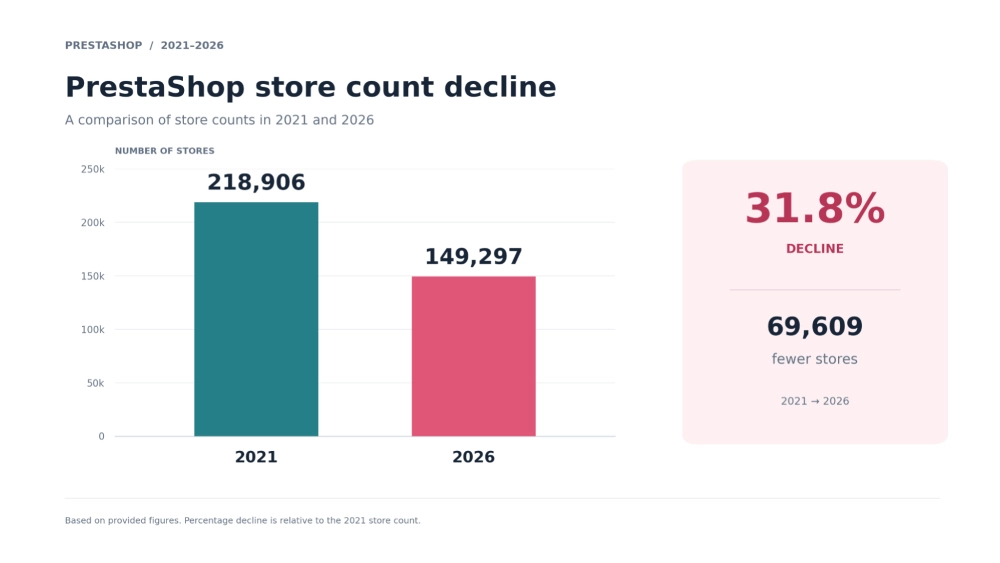
The second change is longer running and easier to measure. StoreLeads platform data records the following as of 4 September 2026.
| Metric | Figure |
|---|---|
| Live PrestaShop stores | 149,297 |
| Peak store count | 218,906 in Q4 2021 |
| Decline from peak | 32% fewer stores |
| Decline year over year | 15% in Q2 2026 |
| Decline quarter over quarter | 5.3% in Q2 2026 |
| Stores gained in 90 days | 1,012 |
| Stores lost in 90 days | 1,362 |
| Departing merchants choosing WooCommerce | 485 |
| Departing merchants choosing Shopify | 365 |
| Departing merchants choosing a custom build | 322 |
| Largest markets | France 14.9%, Spain 10.4%, Poland 8.9%, Italy 7.4% |
Worth being straight about one number in that table. Shopify is the second most common destination, not the first. More departing PrestaShop merchants move to WooCommerce than to Shopify. If you want to stay on open source and keep full control of your hosting, WooCommerce is the closer relative and you should consider it seriously. Shopify wins when you want to stop maintaining infrastructure at all.
What About PrestaShop Versions and Support?
PrestaShop 9 is the current major version. The project documents its own maintenance model plainly: when a new minor version ships, the previous one reaches end of life immediately and receives neither bug fixes nor security patches. Only the latest branch is maintained.
That matters if you are running an older 1.7 or 8.x store, which many merchants are. Staying put is not a neutral choice once your branch stops receiving security patches. Upgrading within PrestaShop is a real option and often the right one. Moving platforms is the other. Doing nothing is the option that quietly accumulates risk.
What Data Can Be Migrated from PrestaShop to Shopify?
Some of your store transfers cleanly, some needs manual work, and some cannot come across at all. Knowing the third column before you start is what keeps a migration calm.
| Transfers cleanly | Needs manual mapping | Cannot be preserved |
|---|---|---|
| Products, references, descriptions | Combinations and attribute sets | PrestaShop URL structure |
| Product images | Category tree and menu structure | PrestaShop modules |
| Customer records | Customer passwords | Custom theme and template overrides |
| Order history | Cart rules, vouchers and discounts | Historic analytics continuity |
| Product and specific pricing | Tax rules and carrier configuration | Server side hooks and overrides |
| Stock quantities | Multiple language content | SQL level customisations |
| Customer addresses | Product reviews and ratings | Anything tied to your host |
Two entries need a note. Passwords never transfer between platforms, because they are stored hashed and the hashing differs. Every customer resets on first login, so write that email before launch rather than after.
Modules are the other one. A PrestaShop store with fifteen modules is really fifteen separate decisions: does this move to a Shopify app, does it get custom built, or does it get dropped. Make that list early, because discovering it halfway through is what makes projects overrun.
How Do You Migrate PrestaShop to Shopify? Three Methods
There is no single right answer. There is a right answer for your catalogue size, your budget and how much of PrestaShop you have customised.
| Method | Cost | Timeline | SEO risk | Best fit |
|---|---|---|---|---|
| Manual export and import | Your time only | 3 to 6 weeks | High. Redirects are easy to skip. | Under 300 products, one language, no custom modules |
| Migration app or tool | $100 to $2,000 | 2 to 4 weeks | Medium. Data moves, redirects usually do not. | 300 to 5,000 products, standard catalogue, few modules |
| Agency migration | $6,000 to $30,000 plus | 4 to 8 weeks | Low. Redirect mapping and testing are part of the work. | Large catalogues, multiple languages or currencies, custom modules |
Method 1: Manual Migration
You export CSV files from the PrestaShop back office, reformat them to Shopify field names, and import. Shopify publishes its own import documentation and it is usable for a straightforward catalogue.
This holds up for a small store with a single language and no combinations. It falls apart quickly once you have attribute sets, specific prices or several thousand references, because the reformatting is where mistakes enter and mistakes at import time are painful to unpick later.
Method 2: Migration Apps and Tools
Prestify, listed on the Shopify App Store, is purpose built for this route. Cart2Cart and LitExtension both handle PrestaShop to Shopify as a configured service. Matrixify works through structured spreadsheet imports and suits teams comfortable with data.
We name them because they are the market, and two of them outrank this page. For a standard catalogue with few modules, a tool is often the sensible choice and we would rather tell you that than sell you something heavier.
Know the limits. Theme rebuild is yours. Redirect mapping is usually yours. Module replacement is yours. The tool moves data and stops.
Method 3: Agency Migration
An agency covers what the tools leave behind: the storefront build, the redirect map, module to app decisions, testing against a staging store, and the cutover itself. Our eCommerce migration services cover the whole path from audit to launch.
This is the right call when your catalogue is large, when you run multiple languages or currencies, when custom modules carry real business logic, or when the revenue moving through the store means a bad launch week is expensive. If your store is simple, use a tool.
How Much Does a PrestaShop to Shopify Migration Cost?
Very few guides on this topic publish numbers. These are honest bands for North American agency rates, covering the migration work only and not your Shopify subscription or apps.
| Store profile | Typical cost | Timeline |
|---|---|---|
| Under 300 products, one language, tool assisted | $4,000 to $6,000 | 2 to 4 weeks |
| 300 to 2,000 products, custom storefront build | $6,000 to $18,000 | 4 to 7 weeks |
| 2,000 plus products, combinations, several modules | $18,000 to $40,000 | 7 to 12 weeks |
| Multiple languages and currencies, B2B pricing, ERP link | $40,000 to $90,000 plus | 12 to 18 weeks |
What pushes a project up a band: inconsistent product data, heavy use of combinations and specific prices, multiple languages, custom modules with no Shopify equivalent, and B2B pricing rules. What keeps it down: a clean catalogue, one language, and a willingness to use a well built existing theme. If you are still comparing running costs between the two platforms, our PrestaShop pricing breakdown covers the subscription side.
The Full PrestaShop to Shopify Migration Process
Thirteen stages. Skipping any of them is where migrations go wrong, and the ones people skip most often are four, eleven and thirteen.
Stage 1: Audit the store and clean the data
Export everything and look at it honestly. Duplicate references, products with no images, categories nobody uses, customers who never ordered. Clean data before migration, never after. This stage saves more time than any other.
Stage 2: Plan the migration and protect against downtime
Build Shopify in parallel on a staging domain while PrestaShop keeps trading. Nothing switches until the new store is tested. The only cutover is DNS, which takes minutes.
Stage 3: Map the technical structure
Document every module, integration, payment method, carrier and custom template override. This document is what the whole project is scoped against.
Stage 4: Record an SEO baseline before you touch anything
Crawl the store and export every live URL. Record current rankings, impressions and traffic. Without this baseline you cannot tell afterwards whether the migration hurt you or the market moved. Our technical SEO services for eCommerce start here on every migration we run.
Stage 5: Set up the Shopify environment
Create the store, configure markets, taxes, shipping zones and payment providers. Get the settings right before data arrives, not after.
Stage 6: Run a test migration
Move a representative slice of the catalogue first, including your most complicated products. Check combinations, pricing, images and category assignment. Fix the mapping, then repeat.
Stage 7: Run the full migration
Move everything. Then run a delta sync to catch orders and customers created since the export, because a live store does not stop while you work.
Stage 8: Handle customer accounts and password resets
Import customers, then prepare the reset email. Send it at launch with a plain explanation. Handled well this is a minor irritation. Handled badly it reads as a broken site.
Stage 9: Rebuild the storefront
Choose a theme and adapt it rather than rebuilding from nothing unless the design genuinely requires it. Our guide to Shopify theme customization covers how far a standard theme will take you.
Stage 10: Reconnect tools and integrations
Analytics, email, reviews, ERP, accounting, shipping. Every PrestaShop module needs a decision and a replacement. Our list of the best Shopify apps is a reasonable starting point for the common ones.
Stage 11: Implement the redirects
Map every old URL to its new address and load the 301 redirects before the DNS switch, not after. This is the single most important stage in the project and the one most often left until it is too late.
Stage 12: Test and launch
Place full test orders end to end including payment capture, tax, shipping and confirmation emails. Check on mobile. Then switch DNS.
Stage 13: Monitor after launch
Crawl for 404s, watch Search Console coverage for a fortnight, reconcile product and order counts against the export, and check speed. A new Shopify store is not automatically fast, so budget time for Shopify speed optimisation rather than assuming the platform handles it.
What Are the Common Challenges in a PrestaShop Migration?
Will You Lose Your SEO Rankings?
Only if you skip the redirect map. PrestaShop and Shopify build product and category URLs differently, so every page gets a new address. Without a 301 pointing each old address at its new one, Google finds 404 pages where your catalogue used to be. With a complete map loaded before launch, rankings typically hold.
How Do You Handle Multiple Languages and Currencies?
Shopify Markets covers multiple currencies and regional pricing natively. For content translation, Shopify Translate and Adapt handle the basics and apps such as Langify and Weglot go further. Plan this before the theme build, because retrofitting translation into a finished storefront is more work than building it in.
What Happens to Your PrestaShop Modules?
Every module is a separate decision: replace with a Shopify app, rebuild custom, or drop. Make the list at Stage 3. Modules carrying real business logic, such as custom pricing or B2B rules, are the ones that need proper scoping rather than a quick app swap.
How Long Does the Downtime Last?
With parallel launch planning, minutes rather than hours. The store is built and tested on a staging domain while PrestaShop keeps selling. The switch is a DNS change. Anyone quoting your days of downtime is describing a different method.
A PrestaShop to Shopify Migration We Ran
Five Star Jewelers: PrestaShop to Shopify migration. A jewellery retailer moved from PrestaShop to Shopify with custom data mapping, parallel launch planning and SEO preservation built into the project rather than bolted on afterwards. [TEAM: add outcome metric, for example rankings retained, traffic within thirty days, or conversion movement.]
Related migrations into Shopify from other platforms: Skin House Facial Bar moved from Squarespace to Shopify with a custom redesign, and our Volusion to Shopify migration guide covers the same method applied to a different source platform.
If you want the platform agnostic version of how we approach this work, see our guide to eCommerce migration.
Final Thoughts
PrestaShop under new ownership is a genuine question mark rather than a verdict. cyber_Folks may invest heavily and the platform may be better for it. What is not in question is the direction of the store count, which has fallen roughly a third since its 2021 peak, or the maintenance model, which stops patching your branch the moment a newer one ships.
If you are on a current version, well maintained and happy, staying is defensible. If you are on an older branch with a pile of modules nobody wants to touch, the decision is already being made for you by the security calendar.
WebDesk Solution has run platform migrations for 14 years, including PrestaShop to Shopify. We will look at your catalogue, your modules and your traffic and tell you honestly whether you need a tool, an agency, or an upgrade within PrestaShop instead. See our eCommerce migration services, our Shopify development work, or the wider eCommerce development capability behind both.
Tell us what you are running and we will map the options. Get a Free Migration Plan.
Frequently Asked Questions
Not if you build a complete 301 redirect map before launch. PrestaShop and Shopify structure URLs differently, so every product, category and content page gets a new address. Map each old URL to its new equivalent and load the redirects before the DNS switch. Skip that step and Google finds 404 pages where your catalogue was.
Order history migrates, including line items, totals and customer association. Passwords do not, on any platform, because they are stored hashed and the hashing methods differ. Every customer resets on the first login. Prepare that email before launch and send it at the switch rather than letting people discover it themselves.
Shopify Markets handles currencies and regional pricing natively. For translated content, Shopify Translate and Adapt cover the basics, while apps such as Langify and Weglot go further. Decide this before the storefront build. Retrofitting translation into a finished theme costs more than designing for it from the start.
Each module needs its own decision: replace with a Shopify app, rebuild as custom work, or drop. Build that list during the technical audit rather than partway through the project. Modules carrying business logic, such as custom pricing rules or B2B behaviour, need proper scoping because no app maps to them exactly.
Minutes, if the project uses parallel launch planning. Shopify is built and tested on a staging domain while PrestaShop keeps trading, and the only cutover is a DNS change. Quotes describing hours or days of downtime are describing a different and riskier method.
A tool assisted move for a small single language catalogue typically runs $2,000 to $6,000. A mid sized store with a custom storefront falls between $6,000 and $18,000. Large catalogues with combinations and several modules run $18,000 to $40,000. Multilingual B2B stores with an ERP connection start around $40,000.
Two to four weeks for a small catalogue using a migration tool. Four to seven weeks for a mid sized store with a custom storefront. Seven to twelve weeks once you have thousands of references, combinations and several modules to replace. Data quality affects the timeline more than catalogue size does.
No. PrestaShop was sold to cyber_Folks S.A. in February 2026 and continues to be developed, with PrestaShop 9 as the current major version. What has changed is the trajectory. StoreLeads records 149,297 live stores as of September 2026, down from a peak of 218,906 in Q4 2021, a fall of roughly 32%.
More departing PrestaShop merchants choose WooCommerce than Shopify, and it is the closer relative if you want to stay on open source and control your own hosting. Shopify suits you better if you want to stop maintaining infrastructure, want a larger app ecosystem, and are willing to trade some control for that.
Prestify is listed on the Shopify App Store and built specifically for this route. Cart2Cart and LitExtension both run the migration as a configured service. Matrixify handles structured spreadsheet imports and suits data confident teams. All of them move data well. None of them build your theme or your redirect map.
Reviews rarely transfer automatically, because they usually live in a PrestaShop module rather than in the core. Export them before you start and import them into whichever Shopify reviews app you choose. Plan this at the audit stage, since reviews are commercially valuable and easy to lose by accident.
PrestaShop maintains only the latest minor version of a branch. When a new minor release ships, the previous one reaches end of life immediately and receives no further bug fixes or security patches. If you stay, plan to keep upgrading rather than treating your current version as a resting point.
Sometimes, and we will say so if that is the answer. Upgrading is usually the better choice when your store is on a supported branch, your modules are maintained, and your team is comfortable managing hosting. Migrating makes more sense when you are several versions behind, carrying unmaintained modules, or want out of infrastructure management entirely.





