Have you ever thought you could launch your online store without making any upfront financial commitment? Yes, that’s possible now with Shopify’s free trial. The eCommerce platform officially launched the 3-day free trial in November 2022. Various businesses and entrepreneurs have taken advantage of this offer to build online stores.
Shopify offers a 3-day free trial without the need for a credit card. However, as we are the official partner of Shopify, you can get a 3-day free trial, plus 3 months of Shopify for $1 per month on selected plans.
Hence, you have an excellent opportunity to build an attractive store, integrate various products and services, set up payment gateways, and attract the right audience, ultimately driving sales and conversions—all with minimal investment.
In short, you can test whether Shopify is the right eCommerce platform for your business. Here, we will share the step-by-step process for claiming your free Shopify trial. In addition, we will provide steps to extend the free trial to 90 days for just $1.
So, let’s dive in.
Seize the Opportunity: Get Shopify for Just $1
Are you ready to enter the online business world? Look no further! For a limited time, you can access Shopify’s powerful features for just $1.
With Shopify’s $1 offer, you can:
Don’t miss out on this fantastic offer to join millions of successful merchants who have opted for Shopify to bring their business dreams to life. Act fast and start your journey for just $1!
Activating your free trial with Shopify is simple. Follow the steps below to kickstart your online business journey.
First and foremost, visit our free trial link to get this offer.
As soon as you will be redirected to a page given below. Now, enter your Email ID and confirm your Email address by clicking on the “Start free trial” button.

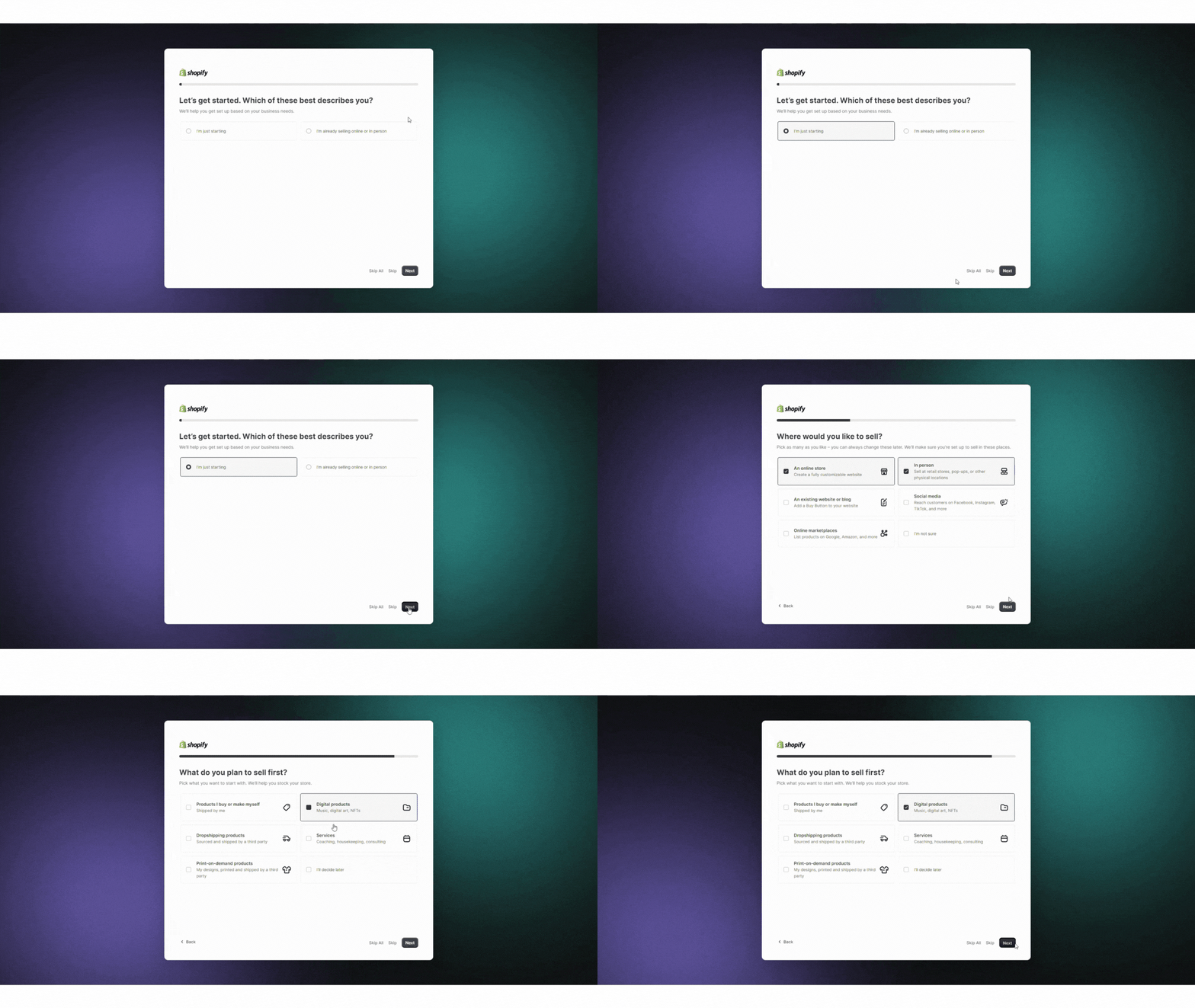
Shopify asks you to provide some details about yourself and your business. This includes questions like
However, you also have the option to skip this particular question or the entire survey if you want.
In this step, you are requested to choose the country where your business will be established. Choose a location and click on the next button. You can definitely change the country later from the settings menu.
Choosing your business location should be your priority. Doing this will help you determine the shipping rates, shipping discounts, default payment gateways, and more.

It is the final step for creating your Shopify ID. Enter your email or sign up using various options, such as Apple, Facebook, or Google Accounts, to connect with Shopify.

Here, you will be redirected to your store. You have the option of adding new products, choosing a theme, or adding several products.

As soon as your 3-day Shopify trial ends, you will get an opportunity to continue for $1 per month for the upcoming three months. As soon as you subscribe to this exclusive time-sensitive deal, you can sell whatever you want on Shopify and even accept user payments.
Here are simple steps to extend your Shopify free trial.
Step 1: Click on Button
In the Shopify dashboard, you will see a “Select a plan” button at the top of the screen; just click on it.

Step 2: Choose a Plan
Now, you will be able to view various plans provided by Shopify. It’s time to choose the most suitable plan as per your needs.

Step 3: Fill in Payment Details
Now, you need to enter all the essential payment details. Lastly, click on “Subscribe.”
It’s better to start with a Basic, Shopify, or Advanced plan, as you have to pay $1 for the next three months, and you are all set. Now, you can use all the essential features of the Shopify plan, start selling products, and continue revenue generation.

Once the 3-day free trial is over, you can continue using Shopify by subscribing to their $1 per month plan, which gives you 3 months of access. After 90 days, regular pricing for the plan you choose will kick in.
After the 3-month trial period, your Shopify account will automatically transition to a paid subscription based on the plan you selected:
To summarize, Shopify’s free trial is the most sought-after way to explore its features without instant financial investment. Through its 3-day free trial and opportunity to extend up to 90 days, Shopify empowers business owners and aspiring entrepreneurs to confidently start their eCommerce journey.
It’s your time to test out Shopify’s robust features, intuitive interface, and range of built-in tools before committing to the leading eCommerce platform.
WebDesk Solution is a leading Shopify development company that helps you set up and develop an online store with Shopify. We have 14+ years of experience in building Shopify stores for clients worldwide.
The Shopify free trial currently lasts for 3 days. Once the 3-day trial ends, you can access Shopify’s 3-month trial offer by paying just $1 per month.
Yes, you can choose your plan whenever you click the ‘Free Trial’ link during the free trial period. Whether you choose Basic, Shopify, or Advanced plans customized to your business needs, you will have the opportunity to select the options that you wish.
The main limitation of the Shopify free trial is that you can’t process orders or sell products during the first three days, as the checkout feature is disabled. To enable the checkout and start accepting orders, you’ll need to upgrade to a paid Shopify plan, which includes signing up for the $1 offer.
No, you don’t need to provide your credit card details to claim Shopify’s 3-day free trial. However, to extend the trial for an additional 90 days, you’ll need to create a Shopify account and pay $1 per month.
As of 2024, Shopify is not providing a 90-day free trial. However, Shopify offers a 3-day free trial with an extension of up to 3 months for just $1 per month. Hence, you can explore the platform’s features before making a long-term commitment.



No matter what stage you are in, we would love to talk to you about your project. No pressure, no obligation, just straight talk and helpful insight.

USA
98 CUTTER MILL RD STE 466, GREAT NECK, NY 11021

Canada
150 King Street W. STE 200
Toronto, ON M5H 1J9
All projects secured by NDA & IP is your's