

Black Friday Marketing Strategy for eCommerce: Ideas, Checklist and Timeline

Category
News & Events

On Wednesday, government and company websites around the world went offline on purpose.
The PHP Foundation had just disclosed two critical vulnerabilities in PHP itself. The advice from the US Cybersecurity and Infrastructure Security Agency, the National Security Agency and Europe’s cybersecurity agency was blunt: patch immediately, or take the system offline until you can.
Both the CISA alert and the NSA advisory are worth reading in full if you own the decision. The NSA states plainly that it expects malicious actors to weaponise these flaws.
There is a detail in the timeline that most coverage has glossed over, and it changes how urgently you should treat this. The vulnerability details leaked before the fix was available, and exploitation attempts were already being reported hours before PHP shipped the patch.
PHP runs roughly 70% of the web. If your store is on Magento, Adobe Commerce, WooCommerce, PrestaShop, Shopware or CS-Cart, it runs on PHP.
If you are on Shopify or BigCommerce, your storefront does not – but that does not automatically mean you are clear, and most coverage telling you otherwise is being careless. There is a section below specifically for you.
Here is what the flaw is, whether it affects you, what to do today, and how to stop being in this position next time. No scare tactics, and no technical detail that would help anyone attack a store.
Key Takeaways
- PHP2Shell is two critical remote code execution flaws in PHP, tracked as CVE-2026-109618 and CVE-2026-109619, with severity reaching CVSS 9.2.
- Nearly every PHP release of the last decade carries at least one of the bugs, back to PHP 5.4.
- Fixed in PHP 8.5.12, 8.4.27, 8.3.36 and 8.2.35. PHP 8.1 and older are at the end of life with no official fix.
- Details leaked before the patch shipped, and exploitation attempts were reported hours before the fix was available. Review logs from 20 October onwards, not from disclosure.
- Self-hosted platforms – Magento, Adobe Commerce, WooCommerce, PrestaShop, Shopware, CS-Cart, OpenCart, Drupal Commerce and custom Laravel builds – all need action.
- Shopify and BigCommerce storefronts are not affected, but your WordPress blog, staging site, landing pages and self-hosted middleware may well be.
- Updating WordPress or Magento does not fix this. The fix is in PHP, on your server, and the service must be restarted afterwards.
- If you cannot patch immediately, WAF filtering and restricted external access reduce risk. They are not substitutes for the update.
What is PHP2Shell?
PHP2Shell is the nickname for two critical vulnerabilities in PHP, the programming language underneath WordPress, WooCommerce, Magento, Adobe Commerce, Drupal, Joomla, PrestaShop, Shopware and Laravel. The PHP Foundation released emergency fixes on 21 October 2026.
The flaws sit in the core PHP engine rather than in any application built on it. They are memory-corruption bugs, and the practical consequence is that an attacker can run their own code on a server without logging in first. Severity reaches CVSS 9.2.
In the words of the PHP project itself, there are no complete mitigations and updating is the only safe choice.
The reach is the uncomfortable part. Wiz found that nearly every PHP release of the last decade carries at least one of the bugs, going back to PHP 5.4. This is not a recent regression you can outrun by having upgraded last year.
How AI changed a decade-old bug into an urgent one
The underlying flaws had been in the PHP codebase for more than ten years without being found. What changed is that AI made them practical to exploit.
Security firm Calif found one during an OpenAI-funded audit of PHP, and Google-owned Wiz independently discovered and reported both. Researchers then used AI to chain together the sequence of steps required – work described as being at the edge of what human researchers could practically achieve.
Separately, CrowdStrike built working exploit code during its own research and confirmed that a single anonymous request could make an Apache worker execute an attacker-specified command. That finding matters for store owners because it means the flaw can be triggered before any of your own application code runs, which is why no plugin, theme or security extension protects you.
The part most coverage got wrong, including ours
The reassuring version of this story is that researchers found the flaws, reported them privately, and PHP patched before anyone knew. That is most of the truth, and it is how we first wrote this article.
It is not all of it. An archive containing leaked vulnerability information was submitted to VirusTotal at 02:29 UTC on 21 October, roughly eleven hours before the fix was released at 13:52 UTC. By 07:34 UTC, Patchstack was reporting multiple active exploitation incidents from hosting partners, and Cloudflare’s CTO reported observing early attacks and deployed protections.
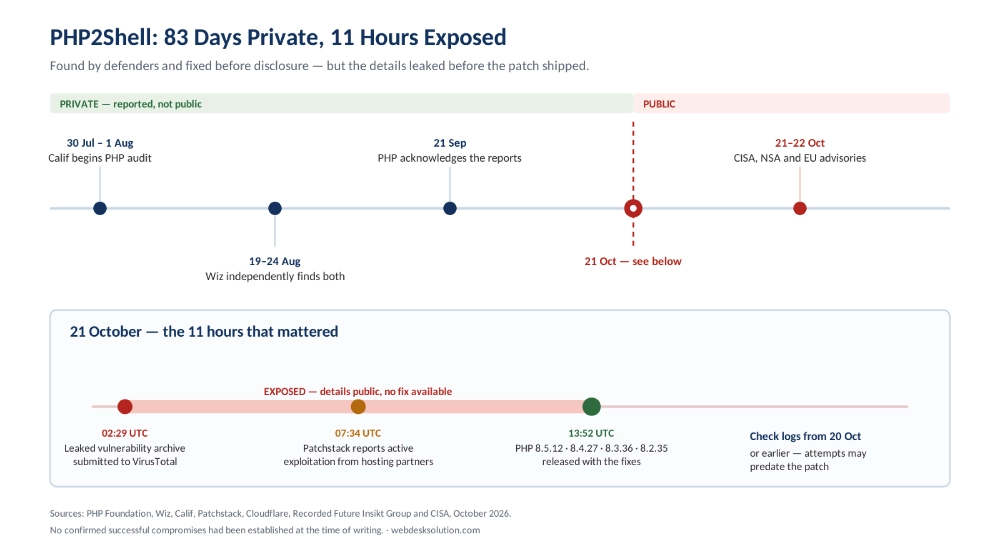
PHP2Shell timeline showing 83 days of private disclosure and the eleven-hour window on 21 October when details were public and no fix existed.
Is your eCommerce store affected?
This is the question every store owner is asking and almost no coverage answers directly. Find your platform.
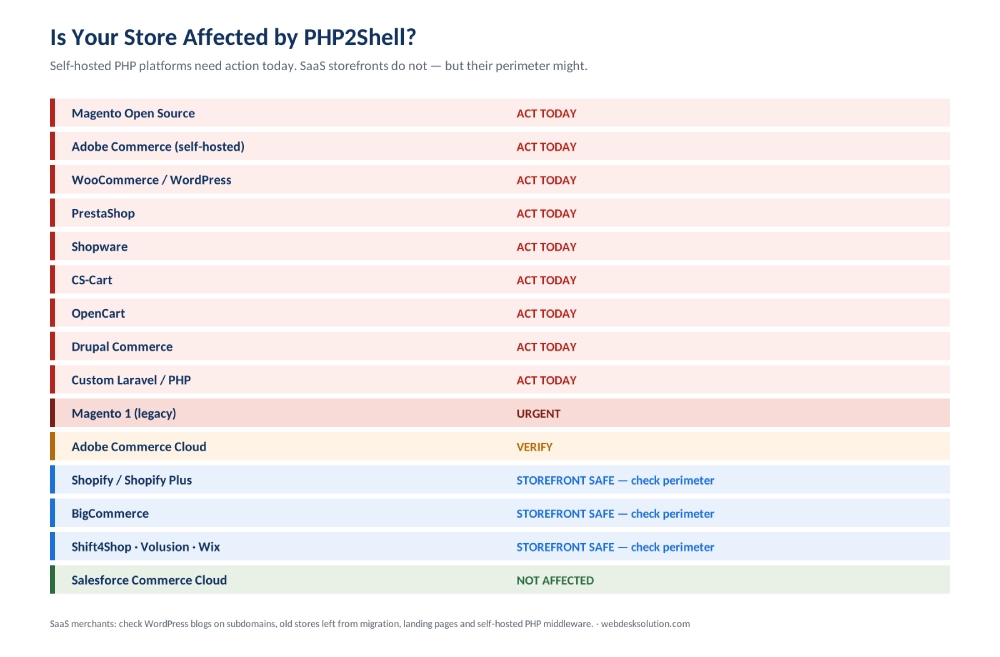
PHP2Shell exposure by eCommerce platform. Self-hosted PHP platforms need action today; SaaS storefronts do not, but their surrounding systems may.
| Your platform | Affected? | What you need to do |
|---|---|---|
| Magento Open Source | YES – today | Self-hosted PHP. Update the server and restart the service. |
| Adobe Commerce (self-hosted) | YES – today | Fully your responsibility. Same steps as Magento Open Source. |
| Adobe Commerce Cloud | Verify | Adobe manages the infrastructure. Confirm with your account team that the fix has landed. |
| WooCommerce / WordPress | YES – today | Updating WordPress will not fix this. Ask your host which PHP build you run. |
| PrestaShop (self-hosted) | YES – today | Server-level PHP update required. |
| Shopware | YES – today | Shopware is PHP and Symfony based. Self-hosted installs need the update. |
| CS-Cart | YES – today | Self-hosted PHP. Update and restart. |
| OpenCart | YES – today | Self-hosted PHP. Update and restart. |
| Drupal Commerce | YES – today | Researchers demonstrated the flaw against Drupal directly. |
| Custom Laravel or PHP build | YES – today | Laravel is PHP. A custom storefront is still a PHP runtime. |
| Magento 1 (still running) | YES – urgent | Unsupported platform on an unsupported PHP branch. Replatforming is the only real answer. |
| Shopify / Shopify Plus | Storefront no | Not a PHP runtime you manage. Check your peripheral systems – see the next section. |
| BigCommerce | Storefront no | SaaS infrastructure. Same perimeter check applies. |
| Shift4Shop, Volusion, Ecwid, Wix, Squarespace | Storefront no | SaaS. Vendor handles the runtime. Perimeter check still applies. |
| Salesforce Commerce Cloud | No | Not PHP based. |
| Headless with a PHP backend | YES – today | A React or Next.js frontend does not protect a PHP backend or middleware layer. |
If your platform sits in the SaaS group, the next section is the one that matters to you.
Shopify and BigCommerce merchants: your storefront is fine, your perimeter might not be
A lot of coverage this week has told SaaS merchants they can ignore PHP2Shell entirely. That is accurate about the storefront and careless about everything else.
You do not manage a PHP runtime inside Shopify or BigCommerce admin, so there is nothing there to patch. But very few brands run only a storefront. Work through this list honestly:
- A WordPress blog on a subdomain, such as blog.yourstore.com. This is the most common exposure by a wide margin and it sits on the same brand.
- A leftover WooCommerce or Magento store from a previous migration, still publicly reachable even though it stopped taking orders.
- Marketing landing pages, microsites or campaign sites running on WordPress outside the main store.
- Self-hosted PHP middleware connecting your store to an ERP, CRM, warehouse system or supplier feed.
- Booking portals, customer portals or internal tools built in PHP.
- A staging or development environment nobody has logged into for a year.
A compromised server on a subdomain is a foothold on your brand. It can host malicious content under your domain name, harvest anything that touches it, and damage the domain reputation your store depends on.
Old environments are the specific blind spot. When we migrate a store, decommissioning the previous one is part of the job, precisely because an abandoned install on an unpatched PHP branch becomes somebody else’s opportunity.
That decommissioning discipline is part of how we run eCommerce migration services, and it is the cheapest security work anyone will ever do for you.
Which PHP versions are fixed
Check your PHP version first. Your host’s control panel shows it, or your developer can confirm in under a minute.

Patched PHP releases for PHP2Shell. Branches 8.1 and older have no official fix.
Current releases are published at php.net/downloads, and your Linux distribution or hosting vendor may have backported the fix to its own packages.
The step people forget
Installing the update is not enough. PHP keeps running the old code until the process restarts, so PHP-FPM or Apache has to be restarted afterwards.
A store that installed the patch but never restarted is still exposed, and the version number may look perfectly correct while it is. Check the running version, not the installed package version.
Apache with mod_php carries particular risk. CrowdStrike demonstrated in its own testing that a single anonymous request could make a mod_php worker execute an attacker-specified command, before any of your store’s own code runs. No plugin, theme or security extension changes that.
What to do today
If you are on managed or shared hosting
Most WooCommerce and smaller Magento stores are. Your host controls the PHP build, so your job is to confirm rather than patch.
Ask them in writing which PHP build each of your sites runs, whether the PHP2Shell fix is installed, and when the service was restarted. Get it in writing, because you will want the record later.
Several major hosts had patches rolling out within hours of disclosure. Others did not. The only way to know which you are with is to ask.
If you run your own server or VPS
- Inventory every PHP installation you own. Not just the main store – staging sites, old subdomains, forgotten dev environments, container images, CI/CD images, and any admin panel such as cPanel or Plesk.
- Identify the PHP branch and package source on each one, including PHP embedded inside third-party applications and appliances.
- Update to the fixed version, taking internet-facing systems first.
- Restart PHP-FPM or Apache, then confirm the running version rather than the installed package version.
- Review logs back to 20 October. Exploitation attempts predate the patch, so a lookback starting at disclosure will miss the window that mattered.
- Record what you patched and when. If you ever need to demonstrate due diligence to a payment processor or an insurer, this is the evidence.
Step one catches more people than you would expect. The forgotten staging site on an old PHP build is a genuinely common route into an otherwise well-run store, and nobody is watching it because nobody remembers it exists.
Knowing what you run, continuously rather than during an emergency, is the whole argument for eCommerce monitoring.
If you cannot patch within hours
Patching is the only complete fix, and nothing below changes that. But if a store genuinely cannot be updated today – a frozen release window, a client approval you do not have, a legacy dependency – there are measures that reduce exposure in the meantime.
- Apply WAF rules. Cloudflare, Fastly, Akamai, AWS, Imperva, Google and Microsoft all published protections for customers who could not update immediately.
- Restrict external access to anything that does not need to be publicly reachable, particularly admin panels, staging environments and internal tools.
- Apply request filtering at the edge.
- Increase log retention and monitoring while you are exposed.
Treat all of this as a countdown rather than a resolution. Recorded Future is explicit that these are not substitutes for patching, and Wiz notes that further variants of the underlying issue exist beyond the two published CVEs.
If you are not sure who is responsible
That uncertainty is itself the finding.
In a surprising number of stores nobody owns the server layer. The agency that built the site has moved on, the host assumes the merchant is handling it, and the merchant assumes the host is. Everyone is reasonable and nothing gets patched.
PHP2Shell is a good moment to settle that question permanently, in writing, with a named owner.
The PHP 8.1 problem, and why it is the real story
There is no patched release for PHP 8.1 or older from the PHP project. Those branches are at the end of life, so there is nothing official to install.
For eCommerce this lands hardest on older Magento. A store on Magento 2.3 or an early 2.4 release is typically pinned to PHP 7.4 or 8.1, because the application will not run on a newer branch. You cannot simply update PHP underneath it – the store will break.
That turns a patching task into a decision, and there is no version of this where waiting makes it cheaper. There are three honest routes, and doing nothing is not one of them.

Three routes for stores on an unsupported PHP branch: upgrade the platform, buy time with commercial extended support, or replatform.
Route one: upgrade the platform
Move to a release that supports a patched PHP branch. For Magento that means a current 2.4 release. It is the best long-term answer because it fixes the next disclosure as well as this one, and it takes weeks rather than hours.
This is work we do constantly, and the version jump is usually less painful than merchants fear. A Magento 2.3 to 2.4.4 upgrade for a store that had fallen several releases behind is a representative example of the scope.
The pattern we see is that stores do not fall behind deliberately. An upgrade gets deferred for one busy quarter, then another, and three years later the platform and the PHP branch underneath it have both aged out of support together.
A later engagement took a store through a performance and security upgrade to Magento 2.4.7, which is the position you want to be in when something like this week happens.
Route two: buy time
Commercial extended support vendors maintain patched builds of end-of-life PHP branches, and several have shipped PHP2Shell fixes for versions the PHP project no longer covers. Your Linux distribution or host may also have backported the fix to its own packages.
This is a legitimate option and it is better than staying exposed. Treat it as what it is, though: a paid stopgap that buys you a planned upgrade instead of a panicked one. The underlying obsolescence does not go away, and you will be having this conversation again.
Before committing, confirm in writing which exact branch is covered and for how long, because vendor coverage lists vary.
Route three: replatform
If the store itself has reached the end of its useful life, moving to a platform someone else keeps patched is the honest answer. Any Magento 1 store still taking orders sits squarely here.
It is the biggest change and the longest runway, but it is also the only one of the three that removes the maintenance burden rather than scheduling it.
Where a store has been left unmaintained long enough, the upgrade and the clean-up happen together, as in a full security and performance rebuild we ran for a store carrying outdated extensions and undocumented custom code.
If you are weighing cost against risk before committing, it helps to see the work broken down rather than quoted as a lump sum.
Our guide to upgrading Magento 2 to the latest version covers what the work actually involves.
And if the conclusion is a full replatform, the budgeting looks different again.
The numbers side of it is covered in Magento 2 migration cost.
This is not only a Magento problem
WooCommerce stores hit the same wall from a different direction. A store carrying old plugins or a legacy theme is often held on an older PHP branch because something in the stack breaks on anything newer.
Stabilising that layer – hosting, PHP version, uptime – is usually the first thing worth fixing, as in a WordPress maintenance and cloud hosting engagement we ran for a site with recurring availability problems.
Older custom PHP applications are the hardest case of all, because there is no vendor upgrade path to follow. Somebody has to modernise the codebase itself.
We did that for a legacy PHP platform in a CodeIgniter modernization delivered with zero downtime, which is proof it can be done without taking the business offline.
How to tell if something has already gone wrong
Because exploitation attempts began before the patch existed, this section matters more than it would in a normal disclosure. Start your lookback on 20 October.
Signals in your server logs
Security vendors have published defensive indicators. None confirms a breach on its own, but any of them is worth a developer’s attention:
- Memory-exhaustion errors in web server logs, particularly messages about allowed memory size being exhausted paired with an unknown file and line reference
- Unusual multipart upload requests followed by memory-limit errors or repeated HTTP 500 responses
- Oversized or malformed session cookies
- Unexplained PHP worker churn or repeated process failures
- Web server or PHP processes spawning unexpected child processes
Signals on the store itself
- Files in your web root you do not recognise, or files whose modified date changed without a deployment
- Admin users you did not create, or existing admin accounts with changed email addresses
- Scheduled tasks or cron jobs nobody on your team added
- Unexplained outbound traffic from the server
- Gaps in your server logs, which can indicate deletion
- Changes to payment or checkout templates – on a compromised store the usual target is card data at checkout
If you suspect a compromise – Preserve evidence before you restart or patch anything, because restarting destroys volatile data an investigator would need. Take a snapshot first. Then rotate every credential the server could have touched: database passwords, API keys, payment gateway credentials, admin accounts and anything stored in configuration files. Command execution on a server means credentials in config files should be treated as exposed.
If something did get in, the priority order is contain, preserve, recover, then harden. Rebuilding in a hurry without establishing how access was gained usually means doing it twice.
We have run that sequence end to end, including a full eCommerce system recovery and server ownership transfer for a store that had lost control of its own infrastructure.
How to be in a better position next time
The uncomfortable part of PHP2Shell is not the bug. It is the method, and the speed.
These flaws sat in PHP for over a decade without being found. AI closed that gap. It also closed the gap at the other end: details leaked and attempts began before most teams had even read the advisory.
Patch cycles measured in weeks are no longer a safe default. Five things follow.
1. Keep an inventory you actually trust
You cannot patch an installation you have forgotten you own. Write down every environment, its platform, its PHP version, its host, and the named person responsible for it. Include staging, old domains, microsites, container images and middleware. Review it quarterly.
This single document is worth more than most security tooling, and almost nobody has one.
2. Stay within two minor versions of current
Most of the pain this week landed on stores pinned to an end-of-life PHP branch by an end-of-life platform release. Falling behind is not a technical decision, it is a deferred one, and it compounds quietly until an emergency makes it urgent and expensive at the same time.
Treat platform upgrades as recurring maintenance with a budget line, not as projects to be approved when something breaks.
3. Decide SaaS versus self-hosted with your eyes open
This week was a genuine operational argument for SaaS. Shopify and BigCommerce merchants had nothing to do on the storefront because somebody else owned the runtime.
That is not a reason to replatform on its own – self-hosting buys control, and plenty of businesses need it. But the maintenance burden is a real cost that belongs in the comparison rather than being discovered during an incident.
If that trade-off is live for you, our guide to choosing an eCommerce platform weighs it properly.
4. Monitor for unauthorised change, not just for outages
Most stores monitor watches for things going wrong. The more useful question is whether anything changed that nobody authorised – a new file, a new admin user, an unexpected outbound connection, a PHP version that moved without a ticket.
Catching that is the difference between a bad afternoon and a bad quarter.
5. Put a name against the server layer
Decide today, in writing, who is responsible for patching the infrastructure under your store, and what their expected response time is for a critical advisory.
If the answer is your host, confirm what they actually commit to. If the answer is nobody, that is the gap to close before the next disclosure, because there will be one.
Continuous maintenance is what eCommerce managed services exist to provide, and it is the difference between a client who was patched on Wednesday afternoon and one who found out from a customer.
Final Thoughts
If you are on Magento, Adobe Commerce, WooCommerce, PrestaShop, Shopware or CS-Cart, there are three honest positions to be in today.
You are on a supported PHP branch and need to confirm the update landed and the service restarted. You are on PHP 8.1 or older and have a decision to make rather than a patch to apply. Or you do not know which of those two you are, which is the position worth resolving first.
If you are on Shopify or BigCommerce, your storefront is fine. Spend ten minutes on the blog, the landing pages and the old staging site instead.
PHP2Shell nearly was a clean save. Researchers found it before attackers did and the fix was ready before disclosure, but the details got out first and attempts started before anyone could patch. That eleven-hour gap is the part worth remembering, because the next disclosure may not give you even that.
Free PHP exposure check – Send us your store URL and we will tell you which PHP version it runs, whether the PHP2Shell fix is in place, what else on your domain is running PHP, and what your options look like if you are on an unsupported branch. It takes us about ten minutes and there is no obligation. If you are already patched we will tell you that and you can get on with your day.
If the answer turns out to be an upgrade rather than a patch, that is a scoped piece of work with a predictable shape, not an open-ended project.
Frequently Asked Questions
PHP2Shell is the nickname for two critical PHP vulnerabilities, CVE-2026-109618 and CVE-2026-109619, disclosed by the PHP Foundation on 21 October 2026 with severity reaching CVSS 9.2. They allow an attacker to run code on a server without authenticating. PHP powers around 70% of websites, which is why the global response was immediate.
Exploitation attempts began before the patch was available. A leaked vulnerability archive reached VirusTotal at 02:29 UTC on 21 October, and Patchstack reported active exploitation incidents by 07:34 UTC, hours before the 13:52 UTC release. No confirmed successful compromises have been established, but review logs from 20 October onwards.
Your Shopify storefront is not, because you do not manage a PHP runtime. But check everything around it: a WordPress blog on a subdomain, landing pages, a leftover store from a previous migration, or self-hosted PHP middleware connecting Shopify to an ERP. Those run PHP and are exposed. The same applies to BigCommerce.
No. The flaw is in the core PHP engine, one layer below your store software. Updating WordPress, WooCommerce or Magento changes nothing. The fix must be applied to the PHP installation on your server, and PHP-FPM or Apache must then be restarted before the patched code actually runs.
PHP 8.5.12, 8.4.27, 8.3.36 and 8.2.35 contain the fixes. PHP 8.1 and older branches are end of life with no official patched release. PHP 8.2 is patched but reaches end of life on 31 December 2026, so treat it as a short-term position rather than a destination.
You have three routes and no official patch. Upgrade the platform to one supporting a patched branch, buy time through commercial extended support or a backported fix from your host, or replatform entirely. Older Magento is commonly pinned to PHP 7.4 or 8.1 and will break if you update underneath it.
Apply WAF rules from your CDN provider, restrict external access to anything that need not be public, filter requests at the edge, and increase log retention. Most major providers published protections. Treat these as a countdown rather than a resolution, because patching is the only complete fix.
Yes. Both are PHP applications, so any self-hosted installation needs the server-level PHP update and a service restart. The same applies to CS-Cart, OpenCart, Drupal Commerce and any custom storefront built on Laravel or another PHP framework, including headless setups with a PHP backend.
Review logs from 20 October for memory-exhaustion errors, unusual multipart upload requests followed by repeated HTTP 500 responses, and web processes spawning unexpected children. On the store, look for unfamiliar files, new admin users, unexpected cron jobs and changes to checkout templates. Preserve evidence before patching.
Keep a trusted inventory of every environment, its PHP version and its named owner. Stay within two minor versions of current rather than deferring upgrades. Monitor for unauthorised change, not just for outages. And put a name and a response time against whoever patches your server layer.