
Is Your eCommerce Store Affected by PHP2Shell? Check Your Platform

Category
Shopify
Expanding globally is one of the essential steps for any e-commerce business, and having the right platform makes all the difference.
Shopify Plus offers a powerful solution with its ‘expansion stores’ feature, enabling enterprises to establish multiple stores. These stores are tailored to specific regions, languages, and currencies while maintaining centralized control. This approach allows businesses to scale across different markets without compromising operational consistency. To dive deeper into its capabilities, explore the full range of Shopify Plus features for improved store performance.
So. Let’s explore how Shopify Plus expansion stores work, their benefits, and the steps involved in setting them up for successful global expansion.
A Shopify Plus expansion store is a separate storefront run under one Plus organisation. Plus includes nine of them, each with its own catalogue, branding and domain. Use expansion stores when regions need genuinely different catalogues, pricing or branding. Use Shopify Markets, which allows up to 50 markets inside a single store, when you mainly need local currencies, languages and domains.
What are Shopify Plus Expansion Stores?
In Shopify Plus, an expansion store is a separate store managed under one account. It runs independently of your main store. Each expansion store can have its own product catalog, branding, and even unique domain names. This setup helps businesses target different markets, audiences, or product lines.
Shopify Plus offers flexibility in managing multiple stores. You can quickly transfer data from your main store, like themes, staff permissions, inventory, and billing info. This makes setting up new stores quick and effortless while keeping consistency across all platforms.
Shopify Plus lets you create up to nine expansion stores for international expansion, and each store can feature localized content. This boosts the customer experience by addressing regional preferences and languages. Localization improves conversions, SEO rankings by refining the user experience for regional shoppers.
That figure is correct and worth citing. Shopify documentation states that the Plus plan supports nine expansion stores for internationalisation, separate physical locations and related purposes. One detail the documentation adds and most guides leave out: each live expansion store requires its own theme licence. If you run a paid theme across all nine, that is nine licences, not one.
Expansion Stores or Shopify Markets? How to Choose
This is the question almost everyone asks before setting anything up, and it is worth answering before you commit, because the two approaches are difficult to unwind once chosen.
Shopify Markets lets you sell internationally from a single store, with local currencies, languages, domains and pricing handled inside one admin. Shopify allows up to 50 markets across all plans, with B2B markets and deeper customisation on Advanced and above. Expansion stores are entirely separate storefronts. Full detail sits in the Shopify expansion stores documentation.
| Shopify Markets | Expansion stores | |
|---|---|---|
| What it is | Regional settings inside one store | Separate storefronts under one organisation |
| How many | Up to 50 markets, all plans | 9 on Plus |
| Catalogue | One catalogue, availability set per market | Fully separate catalogue per store |
| Branding | One theme and brand | Different theme and brand per store |
| Admin | One admin, one set of orders | Separate admin per store |
| Inventory | Shared | Separate unless synced by an app or integration |
| Effort to run | Low | High, multiplied by store count |
| Theme licences | One | One per live store |
| Best for | Same products sold in local currencies and languages | Genuinely different catalogues, pricing models or brands per region |
A straightforward rule. If the only differences between your regions are currency, language, domain and price, use Markets. If the differences are the products themselves, the brand, or the way you sell, use an expansion store. Most businesses that think they need nine stores actually need Markets and one store.
On the SEO question specifically, neither approach is inherently better. Both can support local domains and hreflang. What decides it is execution. Nine stores means nine sets of unique content to write and maintain, and duplicated product descriptions across regional stores is the most common way this goes wrong.
Pros and Cons of Shopify Plus Expansion Stores
When considering Shopify Plus expansion stores for your business, weighing their benefits and drawbacks is crucial. Here’s a detailed look at their pros and cons:
Pros of Shopify Plus Expansion Stores
- Localized Market Experiences: It tailors your offerings for various markets. You can customize language, currency, and cultural aspects to connect with local customers. This leads to better satisfaction and increased sales.
- Enhanced SEO: Each expansion store can target local keywords, attracting more organic traffic and improving your SEO.
- Streamlined Management: It gives you complete control from one admin panel. You can manage multiple stores easily, keeping business operations and performance in check.
- Customizability: You can design each store to reflect different brands or product lines. This ensures a personalized shopping experience for each target audience.
- Risk Mitigation: Dividing operations across regions helps reduce risk against market downturns. If one market faces issues, other stores can reduce the impact, providing business stability.
- Testing Opportunities: You can use expansion stores to test new features, products, or themes. This lets you experiment and learn without affecting your main store.
Need help going global? Schedule a free consultation and let us guide your expansion journey.Contact Us Now
Cons of Shopify Plus Expansion Stores
- Increased Costs: While Shopify Plus has a higher price tag than standard Shopify plans, the advanced scalability and customization justify the cost for growing brands. Managing multiple stores can also add to costs, especially for smaller businesses.
- Management Complexity: Handling several stores can be challenging. Coordinating across locations requires more resources and expertise, complicating operations and customer service.
- Steep Learning Curve: Advanced features and customization options may be confusing. Learning these tools demands time and effort.
- Inconsistent Brand Experience: Managing multiple expansion stores can lead to uneven customer experiences. If each store differs in service or products, it can hurt your brand’s reputation.
What Do Shopify Plus Expansion Stores Actually Cost?
Expansion stores are included in Plus rather than charged separately, which is often reported as “free”. The subscription is not the whole cost. Shopify Plus starts at $2,300 a month, and each store you actually run adds its own operating cost on top.
| Cost | What it is | Rough figure |
|---|---|---|
| Shopify Plus subscription | Covers the organisation and all nine expansion stores | From $2,300 per month |
| Theme licence per live store | Each live expansion store needs its own licence | $0 for free themes, roughly $200 to $400 each for paid |
| Apps per store | Most apps bill per store, not per organisation | Frequently the largest hidden cost |
| Build and localisation | Theme setup, translation, regional content per store | Varies by store count and depth |
| Ongoing maintenance | Updates, testing and support multiplied per store | Scales roughly with store count |
App billing is the one that surprises people. A stack costing $500 a month on one store can approach $4,500 across nine, because most Shopify apps charge per store. Audit your app list against per store pricing before deciding how many expansion stores you actually need. Our Shopify pricing breakdown covers the plan side, and if you have not moved to Plus yet, the guide to upgrading to Shopify Plus covers that step.
How Do You Set Up Shopify Plus Expansion Stores?
Here’s a simple step to help you set up and manage these expansion stores effectively.
Step 1
Sign in to the Shopify Plus account. Go to the “Shopify Admin” dashboard and click “Create Store” to set up your new expansion store.

Step 2
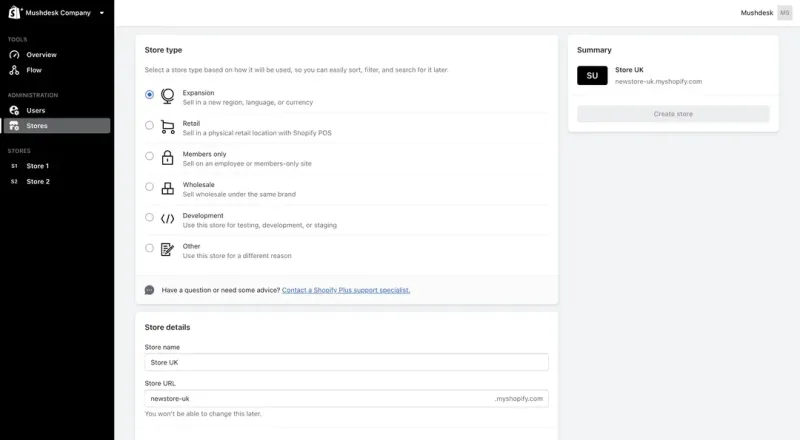
Select “Expansion” as your store type. Enter a store name and set the domain. Once set, the domain can’t be changed, so it matches your branding.
Step 3
Choose apps to preinstall. It’s good to choose apps you already use on your main store. This helps keep things consistent across your stores.
Step 4
In the “Themes” section, click “Import Themes” to move your existing themes. Select the ones you want and publish the theme that suits your new store’s look.
Step 5
Export your essential data from other stores. This includes themes, user info, and relevant data to ensure a smooth transition and consistency across all your Shopify Plus expansion stores.
Because step 2 locks the domain permanently, agree your naming convention across all nine stores before you create the first one. A pattern such as brand.com, brand.ca, brand.co.uk keeps things predictable. Retrofitting a scheme later means recreating stores and losing their history.
Common Issues and Solutions for Shopify Plus Expansion Stores
Running multiple Shopify Plus expansion stores brings significant opportunities but also unique challenges. These can affect how efficiently your business runs and how satisfied your customers feel. Here’s a look at common issues and how to solve them:
Target Market Misalignment
Even if a store is tailored for a specific market, customers can still land on the wrong version of your site. This might happen due to incorrect redirects or unclear regional options. The result may lead to confusion with languages and currencies, poor experiences, and lost sales.
Solution: Implement a Geolocation SetupA robust geolocation setup can fix this. It directs users to the correct store based on their IP address. Using geolocation apps ensures customers see the proper language, currency, and regional content. This makes their experience smoother and boosts the purchase chances since they feel they’re in the right place.
Looking for personalized support to manage your global expansion? Discover how we can help you optimize each store for different markets and regions!Get Personalized Support
Cross-Border Selling Issues
Expanding into new regions brings challenges like local regulations, shipping processes, and customs. Poor management can slow down orders and create legal issues. Customers might face unexpected costs or delays, negatively impacting their trust in your brand.
Solution: Optimize Shipping and ComplianceUse Shopify’s built-in shipping settings to set accurate zones and rates for each region. This way, customers can see the correct options at checkout. Partner with local carriers for quicker, reliable delivery. Cross-border tools can help with legal compliance, making international laws and tax requirements easier to handle.
Coordinating Multiple Stores
Managing multiple stores means handling separate inventories, orders, and returns. Without coordination, this can cause inefficiencies like stock discrepancies, delays, or mismanaged returns.
Solution: Simplify Operations and Assign ResponsibilityStandardize order management processes across all stores. Create clear inventory, orders, and returns protocols to avoid confusion. Assign a dedicated team or individual to oversee operations and maintain smooth communication. This keeps everything running efficiently and resolves issues quickly.
SEO and Visibility Challenges
Global expansion needs a unique SEO strategy for each store. Copying content across stores can lead to SEO penalties and hurt your rankings. This limits your stores’ visibility and organic traffic.
Solution: Localized SEO for Each MarketDesign an SEO strategy for each local market. Do keyword research for each region to improve local search rankings. Create unique product descriptions, meta tags, and localized landing pages to avoid content duplication. Use analytics tools (Google Webmaster and Google Analytics) to review performance and adjust your strategy to keep strong search rankings.
Two technical details belong here. Set hreflang tags across every store so search engines understand which version serves which region, and set a self referencing canonical on each store rather than pointing regional stores back at the main one. Getting either wrong is the usual reason expansion stores underperform in search. Our technical SEO services for eCommerce handle this across multi store setups.
Managing Customer Support Efficiently
Providing consistent support across regions is challenging, especially with different time zones, languages, and expectations. Poor coordination can lead to slow response times and disappointed customers.
Solution: Centralized Support with Local AdaptationCreate a centralized support team trained to handle queries from all stores. Use shared tools to manage requests across time zones. You can also localize FAQ sections for each store to help customers find answers quickly and ease the support team’s load.
Technical Issues Across Stores
Operating multiple stores raises the risk of technical problems like downtime or slow performance. These issues can frustrate customers and lead to lost sales if not quickly addressed.
Solution: Proactive Technical MaintenanceThere should be a technical maintenance team to monitor all stores. Conduct regular system checks and proactive fixes to prevent issues. A responsive team minimizes downtime, keeping stores running smoothly and maintaining customer trust.
Conclusion
Shopify Plus Expansion Stores are essential for global growth. They let you customize each store for different regions, fitting local tastes and simplifying multi-market operations. To maximize these features and ensure a smooth international expansion, take advantage of our Shopify Plus development services. We offer tailored solutions to help set up, manage, and optimize your stores for the global market.
With Shopify Plus, you can simplify your expansion process and confidently focus on growing your business across new markets.
Before you commit to nine stores, be honest about whether you need nine. Most brands expanding internationally are better served by Shopify Markets and one well built store, and reach for expansion stores only where a region genuinely needs its own catalogue or brand. If you are running several storefronts off one back end, our multi storefront development work covers the architecture, and eCommerce development covers the wider build.
Tell us your target markets and your catalogue and we will tell you whether you need Markets or expansion stores.
Frequently Asked Questions
Nine. Shopify documentation states that the Plus plan supports nine expansion stores for internationalisation, separate physical locations and related purposes. They are included in the Plus subscription rather than billed separately, though each live store needs its own theme licence and most apps bill per store.
Neither is inherently better. Both support local domains and hreflang. Execution decides it. Markets are easier to keep consistent because there is one catalogue. Expansion stores give more control but multiply the content you must keep unique, and duplicated product copy across regional stores is the most common cause of poor results.
Markets adds regional settings inside a single store, covering currency, language, domain and pricing, with up to 50 markets available across all plans. Expansion stores are separate storefronts with their own catalogue, branding, theme and admin. Markets suits selling the same products locally. Expansion stores suit genuinely different catalogues or brands.
They are included in the Plus subscription, so there is no per store subscription fee. They are not free to run. Each live store needs its own theme licence, most apps charge per store rather than per organisation, and build, translation and maintenance costs scale with the number of stores you operate.
Not natively. Each expansion store keeps its own inventory. Sharing stock across stores requires an app, a middleware platform, or an integration with your ERP or inventory system. Plan this before launch, because retrofitting inventory sync across several live stores is considerably harder than building it in.
No. The domain is set when the store is created and cannot be changed afterwards. Agree your naming convention across all planned stores before creating the first one, because correcting it later means recreating the store and migrating its data.
A store that reuses an existing theme, apps and catalogue can be live in one to three weeks. A store needing localised content, translated product data, regional payment methods and its own SEO setup typically takes four to eight weeks. Content readiness delays these projects more than build work does.
Yes. Expansion stores suit any case where storefronts need to differ substantially, including separate brands, distinct product lines, or a wholesale storefront alongside retail. Regions are the common use, but the deciding factor is how different the storefronts genuinely need to be, not geography.
To run expansion stores under one organisation, yes. You can open separate standard Shopify accounts instead, but they are billed individually, managed separately, and lack the shared organisation admin, staff permissions and data transfer that make expansion stores manageable at scale.
Use geolocation redirection to route visitors to the correct store by IP, and always offer a visible manual switcher so people can override it. Pair that with correct hreflang tags across all stores so search engines serve the right version, and self referencing canonicals on each store.