


Adobe Commerce B2B Features: What Magento Gives You Natively, and Where Custom Work Starts

Category
Shopify

If you’re running your store on Shopify 1.0, you’ve probably heard about Shopify 2.0. This isn’t just another upgrade. It’s a significant update, offering enhanced performance, better flexibility, and fresh customization options. It’s perfect for businesses ready to grow and outpace the competition.
So, what’s in it for you?
Shopify 2.0 offers intuitive drag-and-drop editing, a highly customizable theme editor, improved app performance, and seamless app integrations. It gives you more control, performance, and freedom over your store. Whether you want to enhance user experience or use advanced features for increased sales, upgrading to the Shopify 2.0 version opens up various possibilities.
This blog will explore the top benefits of upgrading to Shopify 2.0. We’ll also cover how to upgrade to Shopify 2.0 with three methods. Whether downloading a new theme, migrating manually, or upgrading your current theme, this blog will help you through a smooth migration process.
What is Shopify 2.0?
Shopify 2.0, announced on June 29, 2021, is a major upgrade to the Shopify e-commerce platform to enhance the user experience for merchants and developers. Shopify 2.0 introduces a new theme architecture at its core, offering greater customization across all store pages. Merchants can easily manage content and design unique customer experiences without extensive coding skills.
During the launch of Shopify Unite, the company highlighted that Online Store 2.0 opens up vast opportunities for developers. Key features include:
- Sections on Every Page: Allows merchants to add sections to all pages, not just the homepage, overcoming the limitation of Shopify 1.0. This provides more flexibility for customizing store layouts.
- App-Powered Blocks: Shopify 2.0 allows apps to integrate as customizable blocks, which can be easily added, moved, and adjusted within the theme editor—no complex coding required.
- Improved Meta Fields: Shopify 2.0 enables merchants to easily add custom fields, like additional product details, without needing third-party apps. This simplifies data management and enhances store customization.
- New Developer Tools: Shopify 2.0 introduces various tools to enhance platform functionality, including a new theme editor, GitHub integration and enhanced theme-checking capabilities to improve overall platform functionality and flexibility.
Shopify 2.0 is a transformative upgrade that allows merchants to create tailored, engaging online shopping experiences.
Benefits of Upgrading to Shopify 2.0
Shopify 2.0 migration brings significant benefits that boost online store functionality, customization, and overall performance. Let’s explore these advantages.
1. Better Storefront Customization
Shopify 2.0 introduces a significant improvement “Sections Everywhere” feature. This upgrade allows merchants to customize any page, not just the homepage. You can now add, remove, and rearrange content sections freely.
This flexibility creates a personalized shopping experience. Merchants can design unique layouts for product pages, collection pages, blogs, and more.
The drag-and-drop interface makes designing simple. You don’t need extensive coding skills. Changes can be made in real-time, enabling quick experiments with layouts and designs. This customization helps brands showcase their identity and engage customers effectively.
2. Easier Theme Editing and Updates
The updated theme editor in Shopify 2.0 makes editing easier than ever. It features a user-friendly interface with a tree view of all content elements. This design helps merchants navigate their stores easily. With quick access to sections, blocks, and settings, you won’t get lost in complex code.
Shopify 2.0 also supports theme versioning, allowing you to update your theme while maintaining a modern look and ensuring compatibility with the latest features and security updates.
However, while theme versioning is helpful, it’s important to note that customizations may not automatically carry over during an update. Depending on how they were added, certain customizations may still need to be manually re-applied. To minimize errors, Shopify lets you preview changes before going live, helping you ensure everything looks as expected before the update takes effect.
3. Enhanced Mobile Experience
Shopify 2.0 focuses on mobile optimization, ensuring all themes are responsive and load quickly on any device. The default theme, Dawn, is designed for superior mobile performance.
With mobile-first design principles, Shopify 2.0 enhances usability on smartphones and tablets. Touch-friendly navigation and streamlined checkouts make shopping effortless for mobile users. This focus on mobile usability retains customers and boosts conversion rates as more shoppers choose their devices for online purchases.
4. Increased Store Speed and Performance
Shopify 2.0 introduces a new architecture that significantly boosts site speed and performance. This upgrade features JSON templates and app blocks, making page loading more efficient and improving user experience.
The JSON template system allows for dynamic content loading. This means pages render faster by processing less data at once. Users see quicker load times since only essential elements are fetched. For example, Dawn’s default theme is up to 35% faster than the previous Debut theme.
Shopify 2.0 also improves image handling and uses lazy loading techniques. Only necessary images load as users scroll, speeding up initial load times and optimizing resource usage across the site.
5. Advanced App Integrations and Capabilities
One of the standout features in Shopify 2.0 is the support for app blocks. Merchants can integrate Shopify apps directly into their storefronts without changing the core code. This modular setup makes adding features, like reviews, loyalty programs, or social media feeds, quick and easy.
Shopify 2.0 also introduces enhanced meta fields, allowing merchants to manage extra product details more efficiently. Custom fields like size guides or warranty info can be added, giving customers all the important product data they need.
These advanced integrations simplify store management and help merchants deliver personalized, richer shopping experiences.
Ready to Upgrade to Shopify 2.0?
Our team of Shopify experts can make your migration seamless and stress-free. Contact us today to unlock the full potential of your online store.
Talk to an Expert3 Ways to Upgrade to Shopify 2.0
In this section, we will explore three methods of how to upgrade to Shopify 2.0. These methods will help you transition to the latest version of the platform and access powerful new features for your store.
Method #1: Download a New Shopify 2.0 Theme
The easiest way to migrate is by choosing a new theme from the Shopify Theme Store. This lets you replace your current theme with one built for Shopify 2.0, offering enhanced features and functionalities.
Simply head to the theme store, where you’ll find a variety of free and premium themes tailored for modern e-commerce. Browse the store, preview themes, and select one that matches your brand’s style and needs.
Method #2: Migrate a Theme Manually
To upgrade your theme to Online Store 2.0, you’ll need to manually migrate it to the new version. If you know HTML, CSS, and Liquid, you can do this yourself. Otherwise, consider hiring a Shopify Partner. For custom themes, contact the original developer or agency for help.
Here’s a simple guide for manual Shopify 2.0 migration:
- Create a copy of your current theme. Work on this copy to keep your original intact.
- Check for outdated sections and remove them.
- Move all Liquid and HTML code into new sections.
- Remove the old Liquid template file.
- Make a new JSON template file for Online Store 2.0.
- Check the new template to ensure it works.
- Make sure all section links are updated.
- Adjust your sections to support app blocks.
- Apply these steps to any other sections or features.
Follow these steps to upgrade to Online Store 2.0 while keeping your theme’s original look and functionality. These steps apply to themes from the Shopify Theme Store. For custom themes, consult your developer for specific instructions.
Method #3: Download a New Version of the Theme
If your theme developer has updated your theme for Online Store 2.0, you can manually add this new version to your store. Unlike automatic updates, this one requires manual installation.
To check for an update:
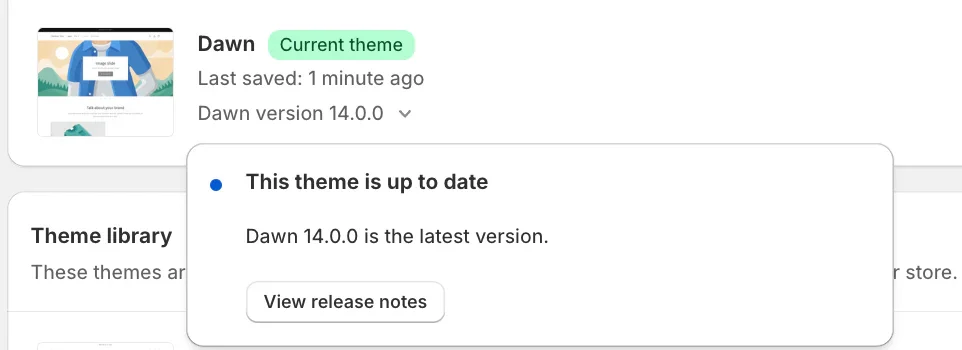
- In Shopify admin, go to Online Store > Themes.
- Look at your theme’s version number. If it’s current, you’ll see “This theme is up to date.”
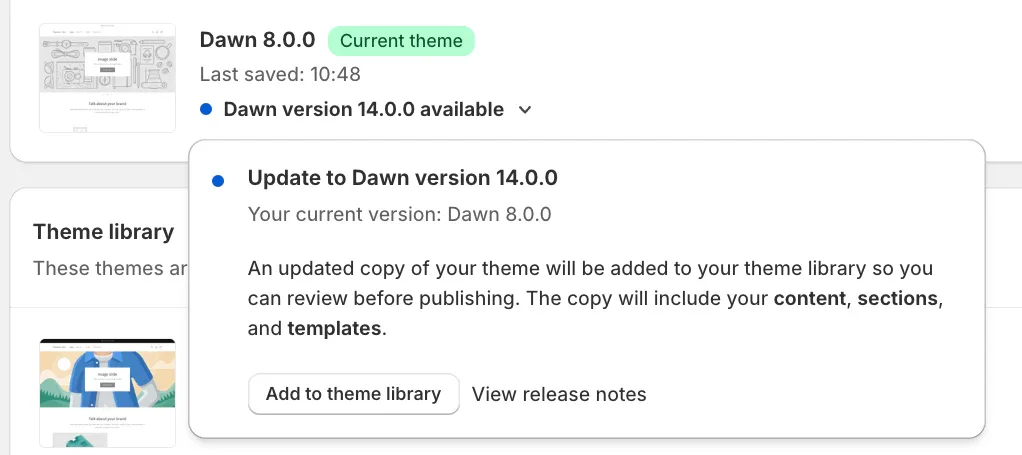
When an update is available:
- A notification will appear in the admin.
- Click the notification and choose Add to Theme Library.
- Optionally, click View release notes to see what’s new.
The updated theme will keep the customizations made through the theme editor, such as:
- Changes to theme settings
- Page layout adjustments
- Content modifications
However, if you or an app made code changes, these might not transfer. Use a Shopify app such as “ThemeWatch” to track and save custom code before updating.
After adding the new version to your theme library:
- Review it to ensure it looks and functions correctly.
- Click Publish to make it live.
If the Add to Theme library option isn’t available, you may need to download a fresh version from the Shopify Theme Store and manually reapply your settings and customizations.
If your theme developer hasn’t released an update or has plans for a similar theme, contact them for more information.
Conclusion
Upgrading to Shopify 2.0 brings huge benefits, such as better customization, improved performance, and smoother integrations. However, performance improvements may vary depending on factors like the themes and apps in use. To make your Shopify 2.0 migration effortless, whether you’re picking a new theme, manually migrating, or updating your current one, an expert can make a huge difference.
For professional support with your Shopify upgrade, reach out to our team of Shopify experts. We specialize in Shopify development and migration, ensuring you get the maximum benefits out of Shopify 2.0’s powerful features.





