eCommerce ERP Integration: What Connects, What Breaks, and How to Scope It

Category
Shopify
Expanding globally is one of the essential steps for any e-commerce business, and having the right platform makes all the difference.
Shopify Plus offers a powerful solution with its ‘expansion stores’ feature, enabling enterprises to establish multiple stores. These stores are tailored to specific regions, languages, and currencies while maintaining centralized control. This approach allows businesses to scale across different markets without compromising operational consistency. To dive deeper into its capabilities, explore the full range of Shopify Plus features for improved store performance.
So. Let’s explore how Shopify Plus expansion stores work, their benefits, and the steps involved in setting them up for successful global expansion.
What are Shopify Plus Expansion Stores?
In Shopify Plus, an expansion store is a separate store managed under one account. It runs independently of your main store. Each expansion store can have its own product catalog, branding, and even unique domain names. This setup helps businesses target different markets, audiences, or product lines.
Shopify Plus offers flexibility in managing multiple stores. You can quickly transfer data from your main store, like themes, staff permissions, inventory, and billing info. This makes setting up new stores quick and effortless while keeping consistency across all platforms.
Shopify Plus lets you create up to nine expansion stores for international expansion, and each store can feature localized content. This boosts the customer experience by addressing regional preferences and languages. Localization improves conversions, SEO rankings by refining the user experience for regional shoppers.
Pros and Cons of Shopify Plus Expansion Stores
When considering Shopify Plus expansion stores for your business, weighing their benefits and drawbacks is crucial. Here’s a detailed look at their pros and cons:
Pros of Shopify Plus Expansion Stores
- Localized Market Experiences: It tailors your offerings for various markets. You can customize language, currency, and cultural aspects to connect with local customers. This leads to better satisfaction and increased sales.
- Enhanced SEO: Each expansion store can target local keywords, attracting more organic traffic and improving your SEO.
- Streamlined Management: It gives you complete control from one admin panel. You can manage multiple stores easily, keeping business operations and performance in check.
- Customizability: You can design each store to reflect different brands or product lines. This ensures a personalized shopping experience for each target audience.
- Risk Mitigation: Dividing operations across regions helps reduce risk against market downturns. If one market faces issues, other stores can reduce the impact, providing business stability.
- Testing Opportunities: You can use expansion stores to test new features, products, or themes. This lets you experiment and learn without affecting your main store.
Need help going global? Schedule a free consultation and let us guide your expansion journey.Contact Us Now
Cons of Shopify Plus Expansion Stores
- Increased Costs: While Shopify Plus has a higher price tag than standard Shopify plans, the advanced scalability and customization justify the cost for growing brands. Managing multiple stores can also add to costs, especially for smaller businesses.
- Management Complexity: Handling several stores can be challenging. Coordinating across locations requires more resources and expertise, complicating operations and customer service.
- Steep Learning Curve: Advanced features and customization options may be confusing. Learning these tools demands time and effort.
- Inconsistent Brand Experience: Managing multiple expansion stores can lead to uneven customer experiences. If each store differs in service or products, it can hurt your brand’s reputation.
How Do You Set Up Shopify Plus Expansion Stores?
Here’s a simple step to help you set up and manage these expansion stores effectively.
Step 1
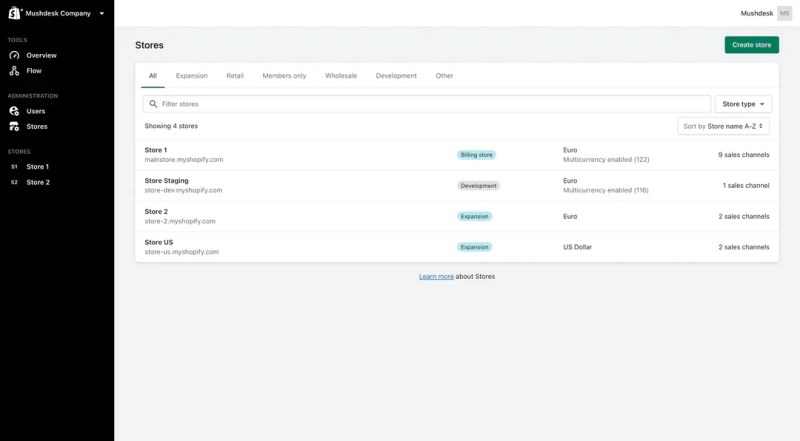
Sign in to the Shopify Plus account. Go to the “Shopify Admin” dashboard and click “Create Store” to set up your new expansion store.
Step 2
Select “Expansion” as your store type. Enter a store name and set the domain. Once set, the domain can’t be changed, so it matches your branding.

Step 3
Choose apps to preinstall. It’s good to choose apps you already use on your main store. This helps keep things consistent across your stores.
Step 4
In the “Themes” section, click “Import Themes” to move your existing themes. Select the ones you want and publish the theme that suits your new store’s look.
Step 5
Export your essential data from other stores. This includes themes, user info, and relevant data to ensure a smooth transition and consistency across all your Shopify Plus expansion stores.
Common Issues and Solutions for Shopify Plus Expansion Stores
Running multiple Shopify Plus expansion stores brings significant opportunities but also unique challenges. These can affect how efficiently your business runs and how satisfied your customers feel. Here’s a look at common issues and how to solve them:
Target Market Misalignment
Even if a store is tailored for a specific market, customers can still land on the wrong version of your site. This might happen due to incorrect redirects or unclear regional options. The result may lead to confusion with languages and currencies, poor experiences, and lost sales.
Solution: Implement a Geolocation SetupA robust geolocation setup can fix this. It directs users to the correct store based on their IP address. Using geolocation apps ensures customers see the proper language, currency, and regional content. This makes their experience smoother and boosts the purchase chances since they feel they’re in the right place.
Looking for personalized support to manage your global expansion? Discover how we can help you optimize each store for different markets and regions!Get Personalized Support
Cross-Border Selling Issues
Expanding into new regions brings challenges like local regulations, shipping processes, and customs. Poor management can slow down orders and create legal issues. Customers might face unexpected costs or delays, negatively impacting their trust in your brand.
Solution: Optimize Shipping and ComplianceUse Shopify’s built-in shipping settings to set accurate zones and rates for each region. This way, customers can see the correct options at checkout. Partner with local carriers for quicker, reliable delivery. Cross-border tools can help with legal compliance, making international laws and tax requirements easier to handle.
Coordinating Multiple Stores
Managing multiple stores means handling separate inventories, orders, and returns. Without coordination, this can cause inefficiencies like stock discrepancies, delays, or mismanaged returns.
Solution: Simplify Operations and Assign ResponsibilityStandardize order management processes across all stores. Create clear inventory, orders, and returns protocols to avoid confusion. Assign a dedicated team or individual to oversee operations and maintain smooth communication. This keeps everything running efficiently and resolves issues quickly.
SEO and Visibility Challenges
Global expansion needs a unique SEO strategy for each store. Copying content across stores can lead to SEO penalties and hurt your rankings. This limits your stores’ visibility and organic traffic.
Solution: Localized SEO for Each MarketDesign an SEO strategy for each local market. Do keyword research for each region to improve local search rankings. Create unique product descriptions, meta tags, and localized landing pages to avoid content duplication. Use analytics tools (Google Webmaster and Google Analytics) to review performance and adjust your strategy to keep strong search rankings.
Managing Customer Support Efficiently
Providing consistent support across regions is challenging, especially with different time zones, languages, and expectations. Poor coordination can lead to slow response times and disappointed customers.
Solution: Centralized Support with Local AdaptationCreate a centralized support team trained to handle queries from all stores. Use shared tools to manage requests across time zones. You can also localize FAQ sections for each store to help customers find answers quickly and ease the support team’s load.
Technical Issues Across Stores
Operating multiple stores raises the risk of technical problems like downtime or slow performance. These issues can frustrate customers and lead to lost sales if not quickly addressed.
Solution: Proactive Technical MaintenanceThere should be a technical maintenance team to monitor all stores. Conduct regular system checks and proactive fixes to prevent issues. A responsive team minimizes downtime, keeping stores running smoothly and maintaining customer trust.
Conclusion
Shopify Plus Expansion Stores are essential for global growth. They let you customize each store for different regions, fitting local tastes and simplifying multi-market operations. To maximize these features and ensure a smooth international expansion, take advantage of our Shopify Plus development services. We offer tailored solutions to help set up, manage, and optimize your stores for the global market.
With Shopify Plus, you can simplify your expansion process and confidently focus on growing your business across new markets.

Related Posts