Black Friday Marketing Strategy for eCommerce: Ideas, Checklist and Timeline

Category
eCommerce Tips & Trends
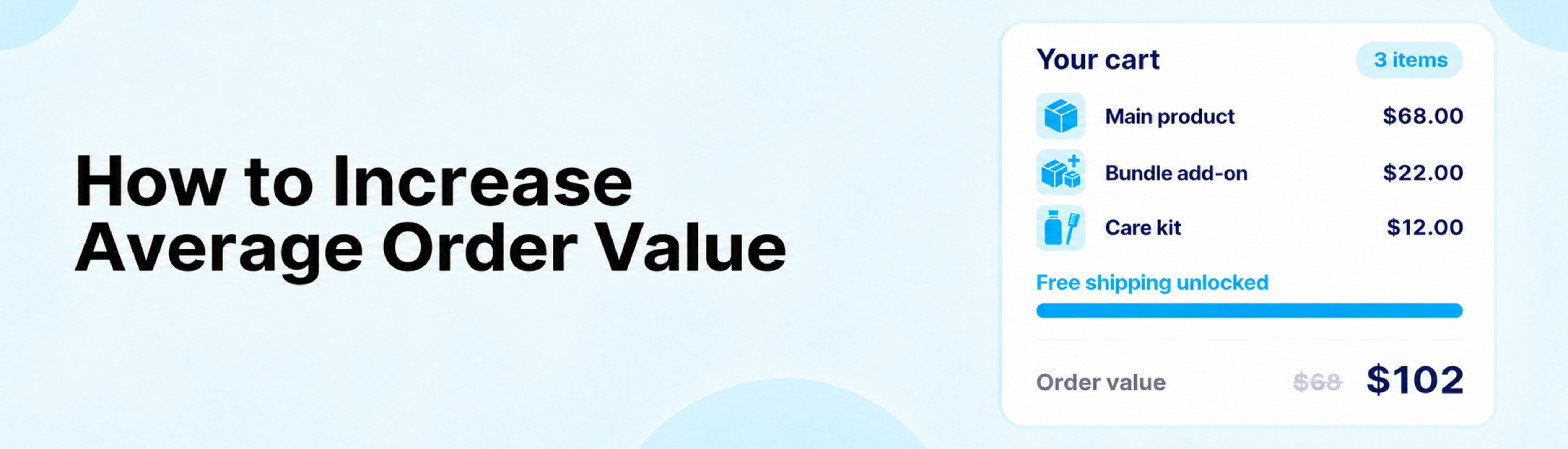
Most eCommerce brands spend the bulk of their budget on getting more people to the store. Fewer spend time on what happens once those people are ready to buy, even though that is where some of the easiest growth sits.
Average order value (AOV) is the amount a customer spends each time they place an order. Knowing how to increase average order value means every visitor you already pay for becomes worth more. It also lets you afford to bid harder for new customers.
The challenge is doing it without annoying shoppers or eating into profit. A pushy upsell can cost you the sale, and a generous free-shipping offer can quietly cut your margin on every order.
This guide covers 15 tactics that work across the whole shopping journey, from the product page to the months after the first order. For each one, you will see when to use it, how it works on Shopify, BigCommerce and Adobe Commerce (Magento), and what to watch on margin.
It also includes the math most guides skip: how to set a free-shipping threshold that pays for itself, and how to tell whether a higher AOV is actually making you more money. If you track your store’s key eCommerce KPIs already, AOV is the number this guide helps you move.
Key Takeaways
- AOV equals total revenue divided by the number of orders, measured after discounts and refunds.
- The fastest levers are bundles, a free-shipping threshold set just above your current AOV, cart add-ons and post-purchase upsells.
- Every AOV tactic should be judged on revenue per visitor and profit per order, not on AOV alone.
- Tactics with low risk to conversion rate, such as cart add-ons and post-purchase offers, are the safest place to start.
- B2B stores raise order value differently, through price lists, minimum order quantities and quote workflows.
What Is Average Order Value (AOV) in eCommerce?
Average order value is the average amount a customer spends each time they check out on your store. It is one of three numbers that decide your online revenue, alongside traffic and conversion rate.
Most of your costs per order stay the same whether the cart holds $40 or $90. Picking, packing, payment fees and the ad click that brought the shopper in cost roughly the same either way. A higher AOV spreads those fixed costs over more revenue, so each order earns more.
That is why AOV sits next to conversion rate in almost every plan to increase eCommerce sales. Traffic gets people to the store, conversion rate gets them to buy, and AOV decides how much each purchase is worth.
How to Calculate Average Order Value
To calculate average order value, divide your revenue by the number of orders in the same period.

For example, a store that took $48,600 from 720 orders last month has an AOV of $67.50. Run the same calculation every month and by channel, so you can see what moves it.
A few details keep the number honest:
- Use revenue after discounts and refunds: Leave out tax and shipping charges, or a change in shipping prices will look like a change in buying behavior.
- Check the median as well as the mean: A handful of large wholesale orders can pull the average up while most shoppers spend far less.
- Split it by segment: AOV by traffic source, device, and new versus returning customers shows you where a tactic is most likely to work.
What Is a Good Average Order Value? Benchmarks by Industry
A good average order value depends on what you sell. Furniture stores regularly see orders in the hundreds of dollars, while coffee brands sit in the $30s and $40s.
The ranges below show median AOV for Shopify and Shopify Plus stores by vertical, based on Carty Labs’ 2026 AOV benchmarks, which aggregate data from more than 5,000 storefronts.
| Vertical | Median AOV range |
|---|---|
| Home and furniture | $180 to $350 |
| Jewelry | $110 to $200 |
| Electronics and gadgets | $100 to $160 |
| Outdoor and sporting goods | $85 to $130 |
| Apparel and accessories | $70 to $95 |
| Beauty and personal care | $55 to $75 |
| Pet supplies | $45 to $65 |
| Coffee and tea | $35 to $50 |
| B2B and wholesale | $650 to $1,400 |
Treat these figures as a sense check, not a target. Your own AOV trend over the last 12 months, split by channel, tells you far more about what is realistic for your store.
Find Your AOV Levers Before You Change Anything
The tactics that work best are the ones that match how your customers already shop. An hour in your store’s analytics will save you from installing apps that solve the wrong problem.
Start with these four checks:
- Order-value spread: Group last quarter’s orders by value ($0 to $25, $25 to $50, and so on). Note where most orders cluster, because your free-shipping threshold should sit just above that point.
- Products bought together: Export orders with two or more items and count the most common pairs. These become your first bundles and cross-sells.
- Margin by product: Rank products by gross margin. Upsells and add-ons should feature higher-margin items, not your thinnest ones.
- Baseline numbers: Write down your current AOV, conversion rate and revenue per visitor. Every tactic below is measured against these three.
On Shopify, the average order value report under Analytics shows the trend over time. BigCommerce and Adobe Commerce both include order and sales reports that cover the same ground.
15 Proven Ways to Increase Average Order Value
The tactics below follow the order a shopper moves through your store: the product page, the cart, checkout, and the months after the first purchase. You do not need all 15. Most stores see the biggest change from three or four that fit their products and customers.

1. Bundle Products Customers Already Buy Together
A bundle sells two or more products as one item, usually at a small saving. It works best when the products are clearly used together, like a camera and a memory card, or a cleanser and a moisturizer.
Build your first bundles from the pairs in your order data, not from slow stock you want to clear. Shoppers can tell when a bundle exists only to move inventory, and they skip it.
On Shopify, the free Shopify Bundles app creates fixed bundles with their own inventory tracking. Adobe Commerce has a native Bundle product type, and BigCommerce stores can sell bundles as their own product with pick-list options. Keep the discount modest, because 10% off items that already carry a thin margin can leave you earning less per order than before.
2. Add a “Frequently Bought Together” Section
A frequently bought together section shows two or three related products under the main item, often with one button to add them all. It is the lightest version of a bundle, because there is no discount to manage.
The suggestions can be set by hand for your best sellers or generated automatically from order history. Done well, this kind of eCommerce personalization feels like helpful advice rather than a sales pitch.
Shopify’s free Search & Discovery app lets you set complementary products, which most current themes display on the product page. BigCommerce and Adobe Commerce both have native related products features. Keep an eye on page speed, since heavy recommendation apps can slow the product page down.
3. Upsell to a Premium Version or Larger Size
An upsell offers a better or bigger version of the product the shopper is already viewing. Showing the options side by side, with the difference spelled out (“twice the capacity for $12 more”), makes the upgrade feel like a choice rather than a push.
Visuals make the bigger option easier to pick. For Fine Art Canvas, we built a Shopify Plus app with real-time 3D previews and variant management, so shoppers can see a larger size or a different finish before they choose.
On Adobe Commerce, the native up-sells feature places upgrade products on the product page. On Shopify and BigCommerce, clear variant labels and an upsell app do the same job.
4. Use Product Quizzes and AI Recommendations
A product quiz asks a few questions about the shopper’s needs, then recommends a routine or a set of products. Because the result feels personal, shoppers are more willing to buy several items at once.
Quizzes suit categories where shoppers are unsure what they need, such as skincare, supplements and coffee. For Snowy Owl Cove, we built a custom skincare quiz with a dynamic recommendation engine that turns each shopper’s answers into a matched product routine.
On Shopify and BigCommerce, a quiz app or a custom build can add the full recommended set to the cart in one click. Adobe Commerce also offers Product Recommendations for AI-driven suggestions across the store.
5. Set a Free-Shipping Threshold Just Above Your Current AOV
Shipping cost is the charge shoppers resent most, which makes a free-shipping threshold one of the most dependable AOV levers. The key is where you set it. Too low, and you give away shipping on orders that would have happened anyway. Too high, and nobody bothers to reach it.
Start just above where most of your orders cluster, then check that the threshold covers its own cost. Divide your current profit per order plus your shipping cost per order by your gross margin, and that is the lowest threshold that keeps you even.
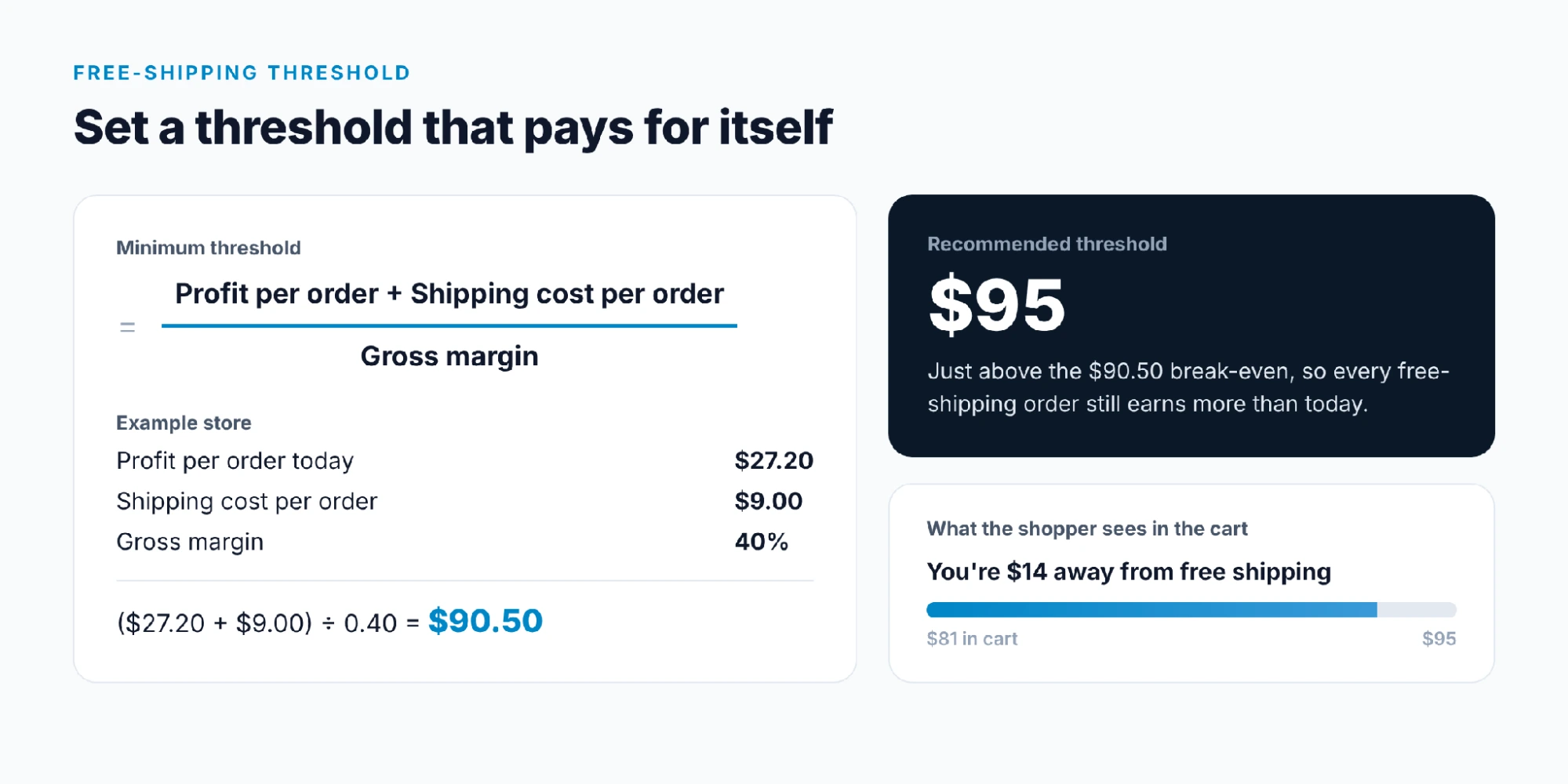
For a store earning $27.20 per order at a 40% margin and paying $9 to ship, the minimum threshold is ($27.20 + $9) ÷ 0.40 = $90.50. Setting it at $95 leaves some room. A progress bar in the cart (“You’re $14 away from free shipping”) turns the threshold into a goal shoppers can see.
Show the threshold on product pages as well as in the cart. Clear shipping costs are one of the core eCommerce checkout best practices, because surprise costs at checkout drive shoppers away.
Shopify, BigCommerce and Adobe Commerce all support free shipping above a minimum cart value without extra apps. Recheck the math whenever your carrier rates change, because every order above the line now absorbs the shipping cost.
6. Cross-Sell Low-Cost Add-Ons in the Cart
The cart is the right place for small, easy add-ons such as batteries, care kits, refills or socks. These items cost little, need no thought, and often close the gap to the free-shipping threshold.
Keep it to two or three suggestions, priced well below the main item. A cart crowded with offers distracts shoppers from the checkout button.
Adobe Commerce shows cross-sell products on the cart page by default. On Shopify, a cart upsell app or a theme section adds the same feature, and our list of the best Shopify apps covers several options. BigCommerce stores usually add it through a theme customization or an app.
7. Offer Tiered Pricing and Volume Discounts
Tiered pricing gives a lower unit price when the shopper buys more: buy two and save 10%, buy four and save 15%. It works best on consumables and items people stock up on, and it is essential for B2B buyers.
Show the tiers in a small table on the product page so the saving is clear before the shopper reaches the cart. Set the top tier so it still clears your target margin per unit.
BigCommerce has native bulk pricing rules on each product, and Adobe Commerce has native tier prices. Shopify stores typically use a volume discount app, while Shopify Plus B2B catalogs support quantity price breaks. When native rules are not enough, a custom build can help. For one enterprise B2B client, we built a private BigCommerce app for promotion management to run tiered and conditional promotions beyond the platform’s standard options.
8. Add Gift-With-Purchase Tiers
A free gift at a set spend level, such as “free travel kit on orders over $100,” often feels more valuable to shoppers than the same amount taken off the price. Samples, branded extras or slow-moving stock with high perceived value and low cost all work well.
Two tiers usually work better than one: a small gift just above your current AOV and a better one at a stretch target. Count each gift at cost, plus any extra shipping weight, when you check the numbers.
Shopify’s “buy X get Y” automatic discounts and BigCommerce promotions can both add a free item once the cart reaches a set value. Adobe Commerce stores typically pair a cart price rule with a free-gift extension.
9. Add a Single Order Bump at Checkout
An order bump is one low-cost offer shown at checkout that the shopper can add with a single tick, such as a protection plan, faster handling or a matching accessory. Because the shopper has already decided to buy, a small and relevant extra rarely puts the sale at risk.
Limit it to one offer, priced at a small fraction of the cart. Anything bigger belongs on the product page, where the shopper has time to think it through.
Checkout changes need care, since a broken checkout costs far more than any upsell earns. For Surplus Furniture, a multi-location retailer, we optimized Magento 2 with a custom checkout and ERP integration so changes like this could run reliably across its stores.
10. Show One-Click Post-Purchase Upsells
A post-purchase upsell appears right after payment, on the thank-you page, and offers one more item that joins the same order. It cannot cost you the original sale, which makes it one of the safest tactics to test.
Offer a refill, a complementary item or a discounted second unit of what the customer just bought. A short, time-limited saving (“add one more for 15% off in the next 10 minutes”) gives the offer a reason to act now.
On Shopify, post-purchase upsell apps use the platform’s checkout and post-purchase extensions, which our guide to Shopify checkout extensibility explains in detail. BigCommerce and Adobe Commerce stores usually add this through an app or a custom module on the order confirmation page.
11. Offer Buy Now, Pay Later on Higher-Ticket Carts
Buy now, pay later (BNPL) splits a purchase into installments. For carts above roughly $100, showing “4 payments of $37.50” on the product page makes a bigger basket feel easier to afford.
Shopify merchants can turn on Shop Pay Installments where it is available. BigCommerce and Adobe Commerce stores can connect providers such as PayPal Pay Later, Affirm or Klarna.
BNPL providers usually charge merchants higher fees than standard card processing. Compare those fees against the AOV lift before you roll it out across the whole catalog.
12. Sell Gifting, Personalization and Registry Add-Ons
Gift wrap, engraving, handwritten notes and gift registries all raise order value without any discount. They also suit seasonal peaks, when shoppers care more about presentation than price.
BigCommerce has native gift wrapping options, and Adobe Commerce includes gift options and gift registries. On Shopify, gift wrap is usually sold as a low-cost product, with engraving text captured through product options.
Registries can do more for order value than a single add-on, because one registry often brings in several buyers. For Our Green House, we built a custom BigCommerce gift registry app with real-time inventory sync, so registry shoppers can find and buy gifts in one place.
13. Build a Loyalty Program With Spend Tiers
A tiered loyalty program rewards customers for reaching spend levels, not just for coming back. When a shopper sees they are $20 away from the next tier, many will add to the order to get there.
Keep the tiers few and the rewards simple, such as points per dollar, a birthday reward, or free shipping at the top tier. Price every reward as a cost per order, and cap how many can stack with other discounts.
Adobe Commerce includes native reward points. Shopify and BigCommerce stores usually run loyalty through an app that shows each customer’s progress in the cart and on their account page.
14. Use Email and SMS Flows to Grow the Next Order
Email and SMS raise AOV on the next order rather than this one. A follow-up that suggests the item that pairs with the last purchase, or a refill reminder timed to when the product runs out, brings shoppers back with a bigger basket in mind.
As a Klaviyo partner, we suggest starting with three flows: a cross-sell email 7 to 14 days after purchase, a replenishment flow for consumables, and a browse-abandonment flow that features bundles. Klaviyo connects natively to Shopify, BigCommerce and Adobe Commerce, so product and order data feed these flows automatically.
Avoid putting a discount code in every message. Customers learn to wait for one, and your full-price orders shrink.
15. Offer Subscribe-and-Save
Subscriptions turn a single order into a repeat one. A “subscribe and save 10%” option on the product page can also lift the first order when shoppers build a larger subscription box.
Shopify offers a free Subscriptions app, and BigCommerce and Adobe Commerce stores add subscriptions through apps or extensions. Build the permanent discount into your pricing from day one, since it applies to every repeat order.
B2B Tactics to Increase Average Order Value
B2B buyers already place large orders, so the goal shifts from adding one more item to making bigger, repeat orders easier to place. Most of the gains come from pricing rules and faster reordering.
- Customer-specific price lists: Show each account its negotiated prices, with better rates at higher quantities.
- Minimum order quantities: Set sensible minimums per product or per order, and explain them clearly on the product page.
- Quote workflows: Let buyers request a quote for large or custom orders instead of abandoning the cart.
- Quick reorder lists: Saved lists and one-click reorders make it easy to add products the buyer forgot last time.
Shopify Plus B2B, BigCommerce B2B Edition and Adobe Commerce all cover these features natively or through their B2B add-ons. The work is usually in setting them up to match how your sales team already sells.
For Braidan Motorsport, we redesigned the store on Shopify Plus with wholesale pricing controls and a quote workflow, so trade buyers can see their own pricing and request larger orders in one place.
How to Increase Conversion Rate and AOV at the Same Time
Raising AOV only helps if your conversion rate does not drop with it. The number that ties the two together is revenue per visitor, which is conversion rate multiplied by AOV. A tactic that lifts AOV by 10% but cuts conversion by 15% loses you money.
| Tactic | Effect on AOV | Risk to conversion rate | Effect on margin |
|---|---|---|---|
| Frequently bought together | Medium | Low | Neutral |
| Product bundles | High | Low | Lower if discounted |
| Free-shipping threshold | High | Low if set near current AOV | Lower per order |
| Cart add-ons | Medium | Low if kept to 2 or 3 | Neutral |
| Checkout order bump | Low to medium | Medium if poorly placed | Neutral |
| Post-purchase upsell | Low to medium | None, shown after payment | Neutral |
| Tiered pricing | High | Low | Lower per unit |
| Buy now, pay later | Medium | Low | Higher fees |
The safest starting points carry little risk to conversion: frequently bought together, cart add-ons and post-purchase upsells. Pair them with the basics that keep shoppers moving, such as fast pages, clear shipping costs and a short checkout.
Returning customers are also worth the effort, because they already trust the brand and are more open to bundles and upsells.
That is what happened when we built a unified Shopify platform with multi-system integrations for one client. The new platform drove 27% higher conversions and 52% more returning customers.
Protect Your Margin: AOV vs Profit per Order
A higher AOV is only worth chasing if profit per order rises with it. Free shipping, discounts and gifts all cost money, and they can quietly turn a bigger basket into a smaller profit.
The chart below uses an example store with a $68 AOV, a 40% gross margin and a $9 shipping cost per order.

In this example, the $75 free-shipping threshold and the 15% bundle discount both raise AOV, yet both lower profit per order. Only the $95 threshold, set with the formula from tactic 5, raises both numbers at once.
Track profit per order, or contribution margin, next to AOV in the same report. If AOV goes up while margin goes down, the tactic needs a higher threshold, a smaller discount or a different product.
How to Test AOV Tactics Without Fooling Yourself
AOV moves around on its own with seasons, promotions and changes in traffic. A simple before-and-after comparison can mislead you, because a holiday week will make almost any tactic look like a win.
Use these rules for a fair test:
- Keep a control group: Show the tactic to part of your traffic and leave the rest on the current experience. Most A/B testing tools and many upsell apps support this.
- Change one thing at a time: If you launch bundles and a new threshold in the same week, you cannot tell which one worked.
- Run for at least two full weeks: This covers every day of the week at least twice. Run longer if your store has low order volume.
- Judge on three numbers together: Revenue per visitor, conversion rate and profit per order. AOV alone hides the trade-offs.
- Check again after 60 days: Steep bundle discounts can pull future orders forward and look better in the first month than they really are.
Plan seasonal pushes separately. Our holiday eCommerce strategy guide covers how to prepare for peak periods without muddying your test results.
AOV Setup Cheat Sheet by Platform
Use this table to see where each tactic lives on your platform. “Native” means it works without an extra app or extension.
| Tactic | Shopify | BigCommerce | Adobe Commerce (Magento) |
|---|---|---|---|
| Product bundles | Shopify Bundles app (free) | Bundle product with pick lists, or an app | Native bundle product type |
| Frequently bought together | Search & Discovery app (free) | Native related products | Native related products |
| Upsell to premium version | Variants or an upsell app | Product options and variants | Native up-sells |
| Free-shipping threshold | Native shipping rates or discount | Native promotions | Native cart price rule |
| Cart add-ons | Theme section or cart upsell app | Theme customization or an app | Native cross-sells |
| Tiered pricing | Volume discount app; native on Plus B2B | Native bulk pricing | Native tier prices |
| Post-purchase upsell | Post-purchase app | App or custom script | Custom module |
| Buy now, pay later | Shop Pay Installments | PayPal Pay Later, Affirm, Klarna | PayPal Pay Later or extensions |
| Loyalty and rewards | Loyalty app | Loyalty app or store credit | Native reward points |
If you want help deciding which of these to set up first, our eCommerce CRO services team tests AOV and conversion changes side by side.
Final Thoughts
Learning how to increase average order value is rarely about one clever trick. It comes from small, well-placed offers across the whole journey, each one checked against conversion rate and margin before it stays.
Start with your own data. Find the products customers already buy together, set a free-shipping threshold that pays for itself, and add low-risk offers in the cart and after checkout. Then test, measure revenue per visitor, and keep only what earns more.
Over 14+ years and 500+ clients, we have built bundles, quizzes, tiered pricing, gift registries and custom checkouts on Shopify, BigCommerce and Adobe Commerce.
Ready to raise the value of every order on your store? Contact our team for an AOV review of your store, with a short list of changes ranked by impact.
Frequently Asked Questions
A good average order value depends on your industry. Median AOV for Shopify stores ranges from about $35 to $50 for coffee and tea up to $180 to $350 for home and furniture. Your own AOV trend over the last 12 months matters more than any benchmark.
Divide total revenue by the number of orders in the same period. A store with $48,600 in revenue from 720 orders has an AOV of $67.50. Use revenue after discounts and refunds, and leave out tax and shipping.
A free-shipping threshold set just above your current AOV, combined with two or three low-cost add-ons in the cart, is usually the quickest win. Both can go live in a day on most platforms. Check that the threshold covers your shipping cost first.
Yes, when it comes with a minimum spend. A threshold slightly above your current AOV gives shoppers a clear reason to add one more item. Free shipping on every order, with no minimum, tends to lift conversion rate instead, and it costs more per order.
Use tactics that add value instead of cutting prices, such as frequently bought together sections, upgrades to a premium version, gift wrap and personalization, product quizzes and loyalty tiers. These raise order value while protecting your margin.
Start with the free Shopify Bundles and Search & Discovery apps for bundles and related products. Add a free-shipping rate with a minimum order value, a cart upsell app and a post-purchase upsell. Our guide to boosting Shopify sales covers the conversion side.

Related Posts